


Introduction
Teased in 2016, and released in 2018, the Arm architecture has been a fairly recent entrant into the full Windows Desktop lineup (Windows Phone and Windows RT notwithstanding), which historically featured predominantly x86 machines.
The main focus of these machines has been power-efficiency - the idea of a laptop with multi-day battery has long been sought-after, and these machines - benefitting from the greater power efficiency of the Arm architecture - hit the mark. For example, the Lenovo Thinkpad T14s Gen6, a Qualcomm Snapdragon X Elite machine, was tested by notebookcheck as lasting 22.5h under normal browsing usage.
Being newcomers, however, these devices had to ensure that they were compatible with the existing ecosystem of software, primarily consisting of x86/x64 software. This is done via emulation, using a technology named “Prism”, and the vast majority of applications work out of the box. There is, however, an overhead when emulating these applications, which can eat into the raw efficiency of these processors. As such, applications can get substantial performance and efficiency increases by being ported to run natively (for a “heavy workload” example, a sample scene in Blender gave a 48% performance increase - other apps may vary).
Given performance improvement figures as high as that can be attained by removing the emulation overheads, it makes sense for developers to consider a native port when targeting these machines. This begs the question; how can they do it?
This blog will cover the findings and learnings that were encountered by Linaro as part of our Windows on Arm enablement work since 2021. We have worked on enablement for a large variety of OSS projects, including Python, LLVM, and Blender, which we maintain. This has helped many developers in the wider ecosystem in their efforts to enable native Windows on Arm, and we continue to work with companies to further progress.
If you decide after reading through this article that the porting process is not for you, Linaro can help! Please reach out to us to discuss things further.
Part 1: Build Systems and Compilers
This part will cover the core parts of most projects - namely, their build systems, compilers, and architectures. Every project is different, but hopefully this will give a broad enough overview to be applicable in most cases.
Build systems
There are a wide variety of build systems available for software - and no two systems are the same. The predominant systems on Windows, however, tend to either be Microsoft’s “MSBuild” system, which ties in directly with Visual Studio, and comes with a full compiler and toolchain, or CMake, which does not, but instead calls out to compilers already installed on the system (typically MSVC via a Visual Studio environment).
MSBuild in some cases is a “one click” solution - you simply add ARM64 as a platform, and away you go, but this is not always the case (especially when pulling in external dependencies via nuget which may not have ARM64 support, etc).
CMake is able to produce solution files for Visual Studio via a “Generator”, which allows for developers familiar with the Visual Studio environment to develop in a way they are comfortable, whilst still retaining the ability to have their application be cross-platform. It can also use the “Ninja” generator, which directly calls the compilation toolchain through a reimagination of “make”, if they prefer a different IDE or development environment, thereby not locking them into Visual Studio. CMake also allows for mixing in additional programming languages such as Rust into a project, but that is considered beyond the scope of this article.
This article will primarily focus on CMake as a build system, as it is the most flexible (in terms of switching toolchains, or cross-platform support), and has typically been the predominant build system for projects throughout the enablement work for Windows on Arm.
Compilers
Typically, on Windows, projects will use one of 3 compilers: MSVC, Clang, or GCC. For Windows on Arm, the two current realistic choices are MSVC and Clang. GCC work is still in active development, and many critical features - such as SEH (Structured Exception Handling) - are missing, or not in a usable state in mainline releases.
For Windows x64, MSVC is usually a reasonable choice - it’s a mature compiler that comes with a well-tested toolchain, and has no major performance concerns. Support is provided by Microsoft, and things like Visual Studio licensing can be managed at an enterprise level by an IT department. It ships and integrates perfectly with Visual Studio, and the tooling there is designed around it.
Clang/LLVM, on the other hand, is usually the compiler of choice on macOS, and some Linux distributions. It is, however, beginning to pick up in popularity on Windows, as recent analysis suggests that it produces more performant code. Typically, it is used as “clang-cl” - a drop-in replacement for MSVC, which emulates its command line arguments - and relies on the various headers, libraries, etc that come with it (msys2 also exists, but is not discussed here).
On ARM64, the performance increase is typically more pronounced. When Blender was switched from using MSVC to clang-cl in 2024, the “cycles” renderer experienced a performance increase of 44%. As such, it is generally worthwhile to consider a switch to clang-cl for developers, especially when looking at Windows on Arm as a platform - it is, of course, better to investigate whether it does result in better performance for your app. There are some trade-offs in terms of code size, security features, etc to also consider, if your project is affected. In addition, if it is required to redistribute any parts of the toolchain, this is perfectly permissible with LLVM.
As a rule, CMake usually defaults to MSVC on Windows, so a vast majority of projects will use that as their compiler - it is, however, fairly easy to switch compilers. For example, when using the “Ninja” generator, this is as simple as specifying CMAKE_C_COMPLIER=“clang-cl” (assuming that clang-cl is on your path). For the Visual Studio generator, you can pass the -T”ClangCl” argument (assuming the built-in LLVM that ships with VS, external installs require the path to explicitly be set).
Part 2: Architectures/Targets and dependencies
This part will cover the different types of “architectures”, or “targets” in Windows on Arm, how they relate, and also how they apply to the case of compiling/importing dependencies.
Architectures / Emulation
Windows on Arm is capable of understanding binaries compiled for multiple different architectures/targets (referred to going forward as targets). These are ARM64, ARM64EC/ARM64X, x64, and x86.
x64/x86
As of Windows 11, it is perfectly possible to run a normal x64/x86 program on an ARM64 machine. When you launch the program, it will be emulated at runtime, and execute as intended. There will, however, be a performance loss as a result of the emulation, as the system has to expend effort to “translate” the x64/x86 instructions into something that the ARM64 processor in the machines can understand.
This translation is JIT, and code can be cached, so often the largest hit is at app startup, or if any code is interpreted (ie, Lua).
Things like memory ordering, etc, will also play a factor. x64/x86 have stricter memory ordering rules than ARM64, meaning that every load and store instruction has to have a memory barrier. Whilst most instructions would be fine with ARM64’s weaker memory ordering, there’s no guarantee of which would be, therefore these barriers have to be issued.
In addition, there is higher power consumption, and therefore a higher battery drain, as more instructions have to be executed - as this is a key point for this platform, it isimportant to bear in mind.
As a result, there is an appreciable overhead for emulation, which results in a functional, but not necessarily ideally performant outcome.
ARM64EC
In the world of Windows on Arm, there exists another “pseudo” architecture, called ARM64EC. ARM64EC is an alternate ABI for ARM64 which enables interop with x64 binaries, whilst still executing as a (more restricted) native executable. Essentially you can compile a program as ARM64EC, and link against an x64 library. That way the host application gets some of the benefits of a “Native” (ARM64EC) binary, whilst still being able to use the x64 library.
An example use-case for this would be if a “black box” library was provided by an external vendor that needed to be used in an application, and they had not yet ported it to native ARM64. This would allow the application to link against, and use, said binary, but not have to use a fully emulated application.
That said, the ARM64EC approach is not without its trade-offs, and typically is not usually the right choice. Whilst it sounds good - “native code whilst still being able to use x64 binaries” - there are a number of drawbacks to it.
A major drawback is that when you compile for ARM64EC, you lose approximately half of the available registers, either because they are being used to emulate x64 registers, or because the corresponding registers simply do not exist on x64. This results in a loss of performance in some cases, as there have to be more frequent transfers to and from cache/memory compared to being able to directly use the registers. This is especially noticeable if an application is using the full NEON width (ie, VFX applications).
This is beginning to change, especially if your application makes use of AVX2 instructions, which allow for some widening of the registers that the process uses. However, this is not applicable in all cases.
Additionally, as ARM64EC is a different ABI to native ARM64, this means that any natively compiled ARM64 code is no longer compatible, and cannot be used. This results in things like hand-rolled assembly files, or performance optimisation libraries - that could have been easily carried over from Linux - being incompatible with these ARM64EC binaries. Typically this results in having to use a C fallback, which is slower.
A good example of this particular issue is FFmpeg, a popular multimedia processing package. Many implementations of various video and audio codecs are written in hand-rolled assembly, as squeezing every drop of performance out of an implementation is critical for things like audio and video processing. In order to get a good level of performance for an ARM64EC version of ffmpeg, all the assembly needed to be rewritten to use the smaller number of registers. Ultimately, this work was not merged into FFmpeg due to the maintenance and complexity overhead.
This highlights the largest drawback of ARM64EC - support from libraries is just not there, and is unlikely to be merged upstream - this means major, often performance-critical parts of the app have to remain under emulation, therefore incurring power-efficiency losses, as discussed in the x64 section. This is why it may be a better choice to consider a native ARM64 binary.
Note: There is a very good in-depth series of blog articles on ARM64EC here, if you prefer more technical depth.
ARM64X
ARM64X is an extension to the regular WinPE executable format that allows for a “hybrid” binary, consisting of x64/ARM64EC code, and native ARM64 code. This differs from the Apple-style “fat binary”, in that it does not contain a full distinct duplication of the code for each ISA - the code is essentially “mix-and-matched” with different bits of code making up the binary being different architectures.
When you build an ARM64X binary, you compile the project twice, with each pass containing the relevant parts for that architecture. On the second pass, the linker then merges the parts together to form a single ARM64X binary.
ARM64X is good if using a single monolithic binary, and can get your build system to agree with it, however there are a lot of subtleties when it comes to linking against dynamic libraries, etc. Therefore, it won’t be covered in this blog article. Typically it is only relevant if you are compiling a library that will be consumed by other applications.
It is worth noting that under Prism, system libraries are ARM64X - this means that any system calls run at native performance levels, even under emulation.
ARM64
The ideal choice for these machines is, of course, compiling a native binary for them. This gives the most performant, optimised code for a project, and allows for all of the Arm architecture’s native power-efficiency, and performance-per-watt to be used to its fullest extent. In the vast majority of cases, this is the best choice, and worth the additional effort to make sure all parts of your application are ported to run natively.
However, it does require all dependencies to be natively ported, and if your application implements things such as compiled plugins, it can make things more complicated.
Dependencies
Most software will ultimately depend on some external libraries, or “dependencies”. Whether it’s a case of using zlib in order to handle compression, or something like OpenImageIO for image processing, binaries need to be present for all of them.
As a result of Linaro’s (and the wider community’s) work over the last 4-5 years, a large proportion of major open-source software (OSS) libraries can be compiled as native ARM64 binaries. This can either be compiling them directly from source, or using a package manager such as VCPKG or conan.
It might also be the case that an application has a plugin ecosystem, where it is possible to compile a plugin for an application, which modifies its behaviour, or adds functionality. For many applications, this is not an issue, as they use a scripting language such as Python or Lua for their plugins, but other applications rely on native compilation for theirs.
It does mean inclusion of these runtimes, however, and can sometimes cause issues (especially Python), as they like to ship their own versions of libraries. Not a blocker, but something to bear in mind.
Workarounds for difficult libraries/plugins
As covered in the “Architectures/Emulation” section, there exist a number of ways to use binaries in an ARM64 program that weren’t originally compiled for it. You could use an ARM64EC binary and link against x64, or (if you are shipping a library) you could use an ARM64X binary and incrementally change the code (assuming static linking). Each has their own benefits and drawbacks.
There does exist another option, which is to have a separate x64 (or ARM64EC) process to handle the x64-only parts, and use IPC (Inter-Process Communication) between the ARM64 and x64 process to pass the results between themselves. This is especially useful for things like loading plugins, with the added security benefit of plugin loading being sandboxed in its own process. This is not always possible, however.
However, there are some libraries that cannot be used as native ARM64. This is usually either because they are closed-source, and the vendor has not yet released ARM64 binaries, or because there was an issue upstream in the case of OSS (such as CI, or maintenance overheads), and a contribution to fix the library was not accepted. Also, some OSS libraries just haven’t been ported yet, as they hadn’t come up.
Part 3: Common pitfalls and issues in the porting process
This section will cover several of the more common issues that were discovered in the process of porting many OSS apps. This is by no means a comprehensive list, or an indication that they will come up, and simply serves as an illustration of some potential issues.
SIMD, and the assumption that Windows == x64
By far and away, the most common assumption in projects was that if the program is being compiled for Windows, then that means that the architecture must be x86, or x64. This results in assumptions of certain headers (such as immintrin.h) always being present on Windows, and that x64-style intrinsics can be used behind an “#if defined(_WIN32)” guard, rather than also having an “#if defined(_M_AMD64)” guard.
Given the inclusion of intrinsic headers, usually this means that SIMD code has been written with only x64 in mind. This poses a problem for ARM64, as intrinsics are not the same over differing architectures. To solve this, there are a couple of solutions, which are the two most common simple fixes:
Soft Intrinsics
This is a library provided by Microsoft as part of the SDK. By including softintrin.h, and linking against softintrin.lib, it should be possible for most x64 intrinsics to “just work”. If you compile targeting ARM64EC, this is automatically included. There have historically been some compatibility issues with this, so it is possible mileage may vary when using this.
There is, however, another (more cross-platform) alternative:
Sse2neon
sse2neon is a header-only library that translates x64 intrinsics directly into ARM64 equivalents at compile-time (with some exceptions, such as floating point rounding, which require defines to determine if ARM64-style or x64-style behaviour is wanted). This means little performance loss (for most intrinsics), as the translation work is done at compile time, and only ARM64 intrinsics are used in the final binary.
It also has the added benefit of being cross-platform compatible with both macOS and Linux, which allows for the same porting process to take place on those platforms too, if desired. As a result, it is used in several large-scale OSS projects, such as Blender, Embree, and RPCS3 (a PS3 Emulator) as their SIMD library of choice.
CPUID calls, and MRS emulation
The most common intrinsic that trips projects up is the use of the __cpuid() call (for example, Lensfun). This is an Intel intrinsic that can get information about the CPU name, vendor, and capabilities. This specific intrinsic is not covered by sse2neon (it is, however in softintrin, for ARM64EC purposes), as it doesn’t really cleanly map.
CPUID equivalent
The “standard” approach on Windows on Arm is to query any such information from the registry, available at “HKEY_LOCAL_MACHINE\HARDWARE\DESCRIPTION\System\CentralProcessor\0”. This sub-key contains relevant values that would typically be retrieved via CPUID, such as the processor name, vendor, and identifier.
This is similar to the approach taken in macOS with machdep.cpu.brand_stringvia sysctl, or Linux via /proc/cpuinfo.
As a small (but interesting) aside, it also contains other values, starting with “CP”:
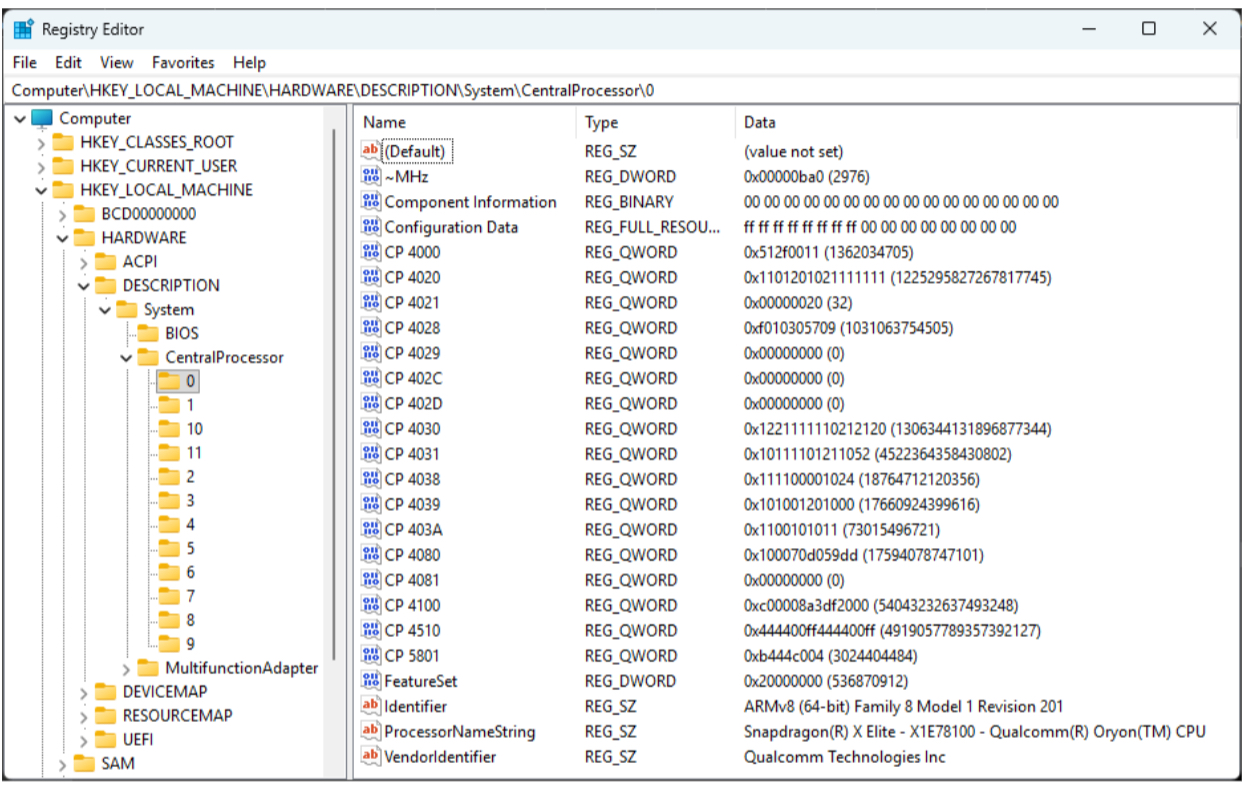
These “CP” values are very poorly documented, but are essentially registers that would not otherwise be accessible - they map to the hexadecimal values of the registers they represent as per the Arm Architecture Reference Manual (the “Arm ARM”). The term “CP” comes from “coprocessor”, terminology that is a holdover from ARMv7.
The hexadecimal mapping is calculated via the macroARM64_SYSREG(op0, op1, crn, crm, op2) in the header winnt.h.
For example:
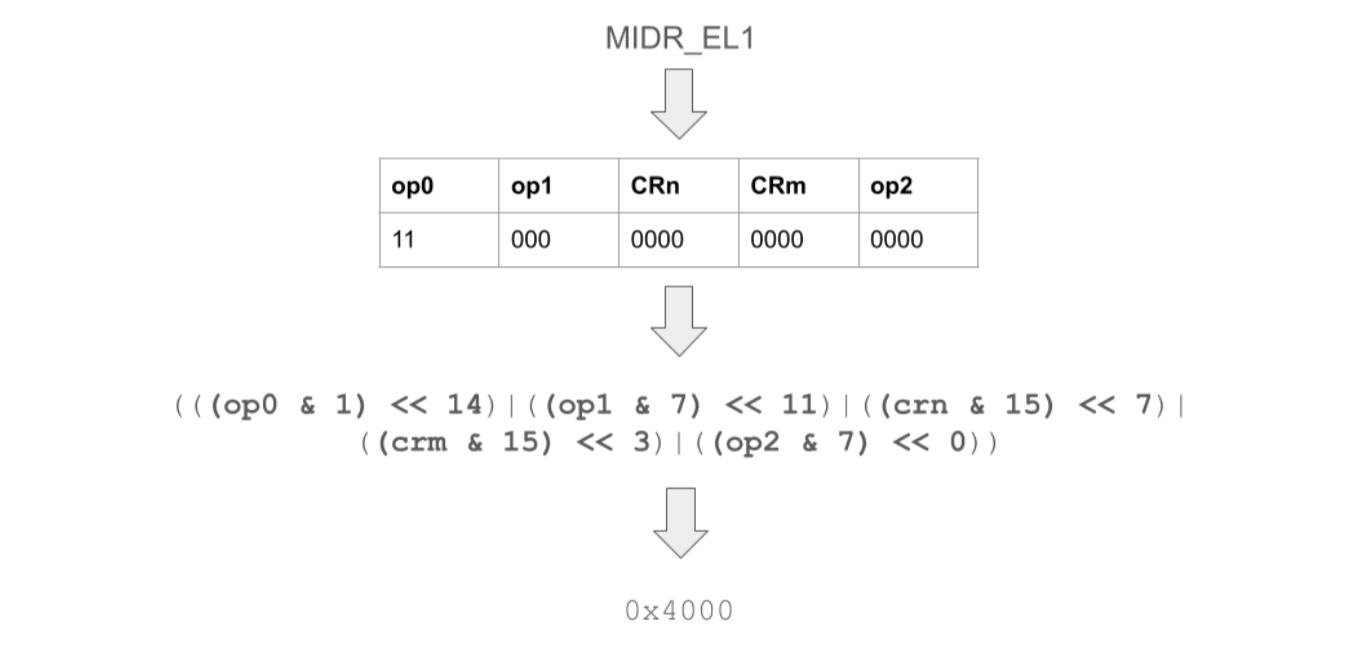
This process can be reversed, in order to calculate which register is represented by a hexadecimal value.
It is important to note that other than MIDR_EL1, these “CP” values are not accurate to the actual ISA level and features supported in Windows, and should not be used. Instead, it is recommended to use IsProcessorFeaturePresent for an accurate indication of the system capabilities.
But, why is doing it this way necessary?
MRS Emulation
On these devices, there is no emulation for MRS instructions when accessing something at a higher privilege level. This means that the common approach taken by Linux ARM64 (MRS **<register>**, MIDR_EL1) to identify CPU capabilities is not valid. When executed, the instruction generates an exception when accessed from user space (EL0).
But why does it work on Linux, not Windows, or macOS?
This is because the Linux Kernel catches this exception, and emulates the result. This approach is uniquely taken by Linux, however as most Arm devices are Linux-based, there is a tendency for some applications to default to that behaviour. On Windows, use IsProcessorFeaturePresent for MIDR_EL1equivalents.
For reading other registers (for example, ARM64_CNTVCT) that would normally be accessed by MRS in Windows on Arm, you can use the intrinsic _ReadStatusReg().
There is also another reason to use that intrinsic - MSVC does not support inline ASM, and many existing applications that support Arm have inline ASM as part of their code base (for example, Arm Compute Library).
ARM64 Assumptions in cross-platform projects
As Arm has historically been a Linux ISA, there are lots of assumptions that are made about certain code paths (this is improving due to macOS now running on Arm meaning abstractions are being implemented), similar to how the default assumption on Windows is an x64 processor.
One of the most common assumptions is that when a program is running on Arm, there must be support for inline assembly. Sadly, this is not the case when using MSVC, which does not support inline assembly for ARM64 or x64 targets.
In many cases ( for example, OpenUSD), this assembly can be replaced with intrinsics. In other cases - such as with the aforementioned Arm Compute Library - this means that MSVC as a compiler is not an option, and LLVM must be used (which does support inline assembly).
Another assumption, which is actually the inverse of the Windows == x64 section above, is that if there’s an ARM64 processor, then it must be a macOS or Linux device, and the presence of things such as /proc/cpuinfo is assumed.
ARM64 code is also often guarded behind an #if defined(__aarch64__) block, which MSVC does not define, meaning the checks have to be amended to#if defined(__aarch64__) || defined(_M_ARM64). If you use LLVM’s clang-cl, the inverse is not true, as it defines_M_ARM64on Windows.
OpenGL graphics, and mesa
The last “major” sticking point on Snapdragon Windows on Arm devices is the implementation of OpenGL. The Adreno GPU drivers that ship with these machines only support DirectX, and as of the Snapdragon X Elite machines, Vulkan. This means that in order to implement OpenGL functionality, there has to be a translation layer.
In this case, the translation layer is mesa, specifically the D3D12 Gallium driver, branded as the Open CL, OpenGL, and Vulkan Compatibility Pack. Articles are available online that explain how this works, or alternatively this was covered in a talk at the Blender Conference 2024, and in a previous article. Essentially, OpenGL functionality is translated into D3D12 calls, and runs on the GPU that way.
This approach comes with its own difficulties. No translation is 100% perfect, and the introduction of more layers can always introduce more bugs or incompatibilities. It is therefore strongly recommended, where possible, to use a D3D or Vulkan backend on these devices. In fact, it can substantially increase performance.
CI, and releasing binaries
On the 3rd of April 2025, GitHub Actions runners for Windows ARM64 finally became freely, publicly, available for projects to use. On the 28th of January 2026, they became freely available for private repositories too (as per standard GitHub allocations). If you use GitHub, this is the easiest option - the builds should easily integrate with your existing CI files, and allow you to build and release binaries for Windows ARM64. It is also possible to access the machines directly. via GitHub Actions for debugging purposes.
Not everyone uses GitHub though, so it’s important to think about alternatives.
Note: There is no version of Windows Server for Windows on Arm at time of writing - only Windows 11 (with the exception of container images, which are not covered here).
Azure Virtual Machines
Azure has Windows on Arm Virtual Machines available for general use, in D sizes. The v5 VMs use Ampere Altra processors, the v6 VMs use Cobalt CPUs, and are configurable to use a variety of different quantities of RAM and CPU. You may find instructions on how to create one of these machines here.
These are the underlying machines that power the Github actions workers.
macOS Virtual Machines
A number of projects have solved the issue of Windows on Arm machine availability by doubling up their Apple Silicon devices to have Windows Virtual Machines running on them through something like UTM, which uses QEMU underneath.
QEMU
Windows on Arm can be Virtualised in QEMU, on a variety of different hosts. For example, macOS as above via HVF (Hypervisor.framework), or alternatively a Linux host via KVM. As of QEMU 11.0 (slated for March 2026), Windows hosts using WHPX virtualisation will be possible too. This means that with access to an existing ARM64 machine with virtualisation capabilities, it is possible to run Windows on them. This may allow for running Windows on Arm in a datacenter, or other cloud provider (assuming they support nested virtualisation).
Physical Windows on Arm machines
You may indeed run your own lab, with your own machines in it. You can, of course, just add physical Windows on Arm machines to your existing lab. These might be the best option if you have things like graphics workloads that you’d like to ensure run as accurately to end-user machines as possible, or have regulatory requirements to run your hardware locally.
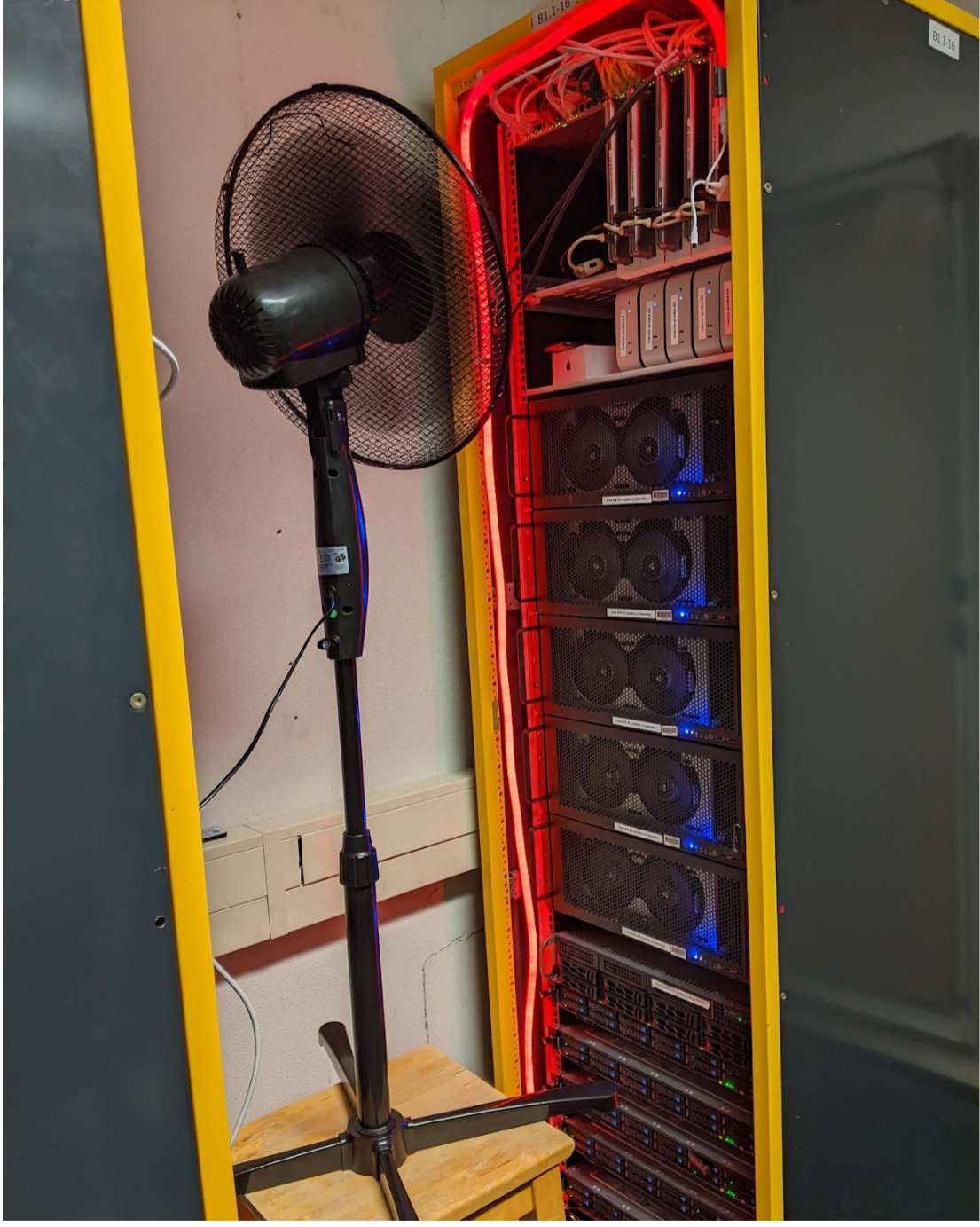
It is important to note that in these cases, the Snapdragon X Elite machines are only commercially available in a laptop form factor. This may make cooling difficult, and means extra checks for lab technicians to ensure things like batteries are not suffering in a warmer lab environment.
An example of how not to cool these machines in production, Credit: Blender
Outside of the standard “consumer” machines, it is possible to purchase an Ampere Altra Developer Platform machine from Adlink or System76 (note any GPU will not have drivers), and install Windows, however it should be noted that proper GPU workloads are not possible on these machines, and that they are not reflective of Windows on Arm consumer hardware.
As mentioned above, Mac Minis are available as a middle-ground. They allow for virtualisation of Windows on Arm via software such as UTM, using their built-in hypervisor framework.
Conclusion
Hopefully, after reading this article, you are more prepared for what to expect when porting a C/C++ project to Windows on Arm. This article is in no way comprehensive, and highlights only a few of the most common issues that could appear, as all software projects are different.
It is, however, important to consider porting your app natively to Windows on Arm - these machines are growing in popularity, and provide clear benefits from their use. The platform offers great efficiency, and getting your application running natively is the best way to help users get the most out of their devices.
If you find you are having porting issues with Windows on Arm, or would like to know more on how we can help, please reach out to us at contact@linaro.org
About the Author
The author, Anthony, has been involved in Windows on Arm since 2017, when he worked on pre-production devices at Arm. Since 2024, he has been the Windows on Arm maintainer for Blender. He is an engineer in Linaro’s Windows on Arm working group, who specialise in software enablement for the platform
Citations
Blender 5.0.1 with the “Classroom” scene, using the cycles render engine in CPU mode