


Introduction
Since its creation by Linaro in 2012, LAVA has been adopted by many companies and individuals to automatically test every level of the software stack on actual devices.
For instance, LAVA is the foundation of KernelCI and OneLab, where LAVA is testing the Linux kernel (for KernelCI) or the bootloader (for OneLab) on customer devices.
While being a reliable testing framework used by multiple testing projects, LAVA has matured. Like most mature projects, some aspects of LAVA deserved some attention and improvements.
In the last months, Linaro, as the main contributor and maintainer of LAVA, invested a lot of engineering effort into modernising LAVA and improving the user experience and the knowledge base.
LAVA (Linaro Automation and Validation Architecture) is an open source framework created by Linaro in 2012 to help developers test software on real hardware. This blog highlights recent updates that make LAVA easier to use, including improved documentation, the Linaro Automation Appliance, and faster command-line testing on new boards.
LAVA documentation rework
For a mature project like LAVA, an extensive and comprehensive documentation is a must-have. Some years ago, LAVA was redesigned from scratch (the infamous LAVA v2 for those who were already there). New documentation began with the redesign but was never completed. So this documentation slowly became irrelevant and outdated.
Since the beginning of 2026, Linaro engineer Chase Qi has worked hard to restructure and rewrite the LAVA documentation to provide stable, extensible documentation.
This documentation is now live and can be accessed at lava.readthedocs.io
This new documentation is structured around 3 sections:
- A general introduction to LAVA principles and usages;
- 3 guides for LAVA Users, Administrators and Developers;
- A strong technical reference section.
The documentation now provides a set of guides covering different aspects of the LAVA experience, as well as a strong technical reference section with details on every LAVA feature.
The Linaro Automation Appliance
While LAVA provides the right service for testing your software on your hardware, automating the hardware you want to test remains a difficult task.
Issues with custom automation harnesses
Most people are currently using custom automation harnesses to integrate their Device Under Test (DUT) into LAVA. In order to automate a DUT, you need to be able to:
- Connect to the serial;
- Power on and off the DUT from the software;
- Press buttons to go into recovery;
- Provide network services like DHCP, DNS, tftpd, NFSD.
You can build a custom automation harness with:

While working, this setup requires a lot of manual handling, manual configuration and is often fragile due to loose cables and unreliable automation hardware.
The Linaro Automation Appliance
The Linaro Automation Appliance (LAA) is a fully integrated Embedded Device testing appliance.
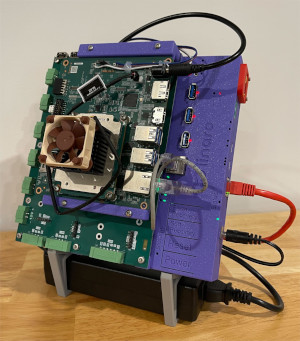
The LAA allows you to quickly integrate a new Device Under Test (DUT) into any test automation framework, such as LAVA, by providing all the necessary hardware components to automatically test your software (from firmware to user-space applications) on that hardware.
The LAA is comprised of three components:
- A Standard Interface Board (SIB) ( the light blue case);
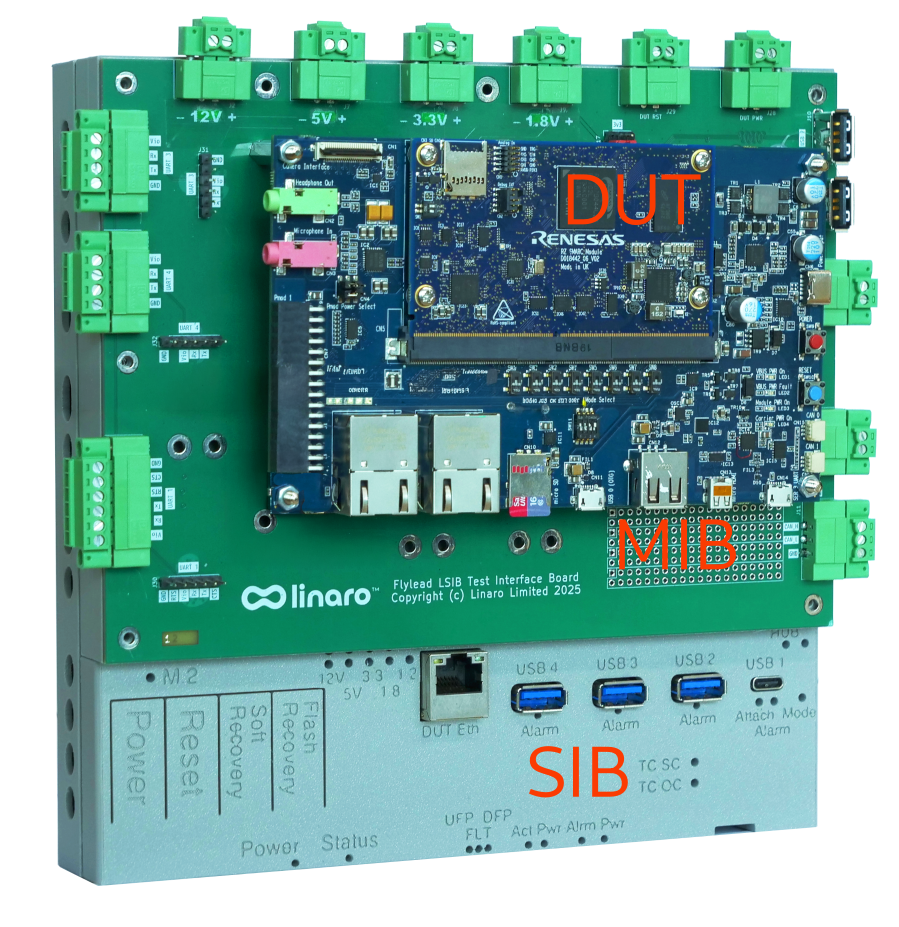
- A Mechanical Interface Board (MIB) ( the green PCB);
- A Device Under Test (DUT) ( the Renesas board).
The SIB is providing all the necessary hardware components to automate tests on your DUTs:
- Managed power rails with power consumption;
- Managed USB hubs (1 type-C, 3 type-A);
- Virtual buttons and GPIOs.
The MIB is a passive PCB that routes everything to your DUT while keeping it securely attached to the Linaro Automation Appliance, eliminating loose cables.
Thanks to the Linaro Automation Appliance, integrating your hardware into your LAVA lab is now a matter of minutes and not days.
LAVA from the command line
Linaro engineers are currently working on making experimenting with LAVA easier and faster. In the near future, you will be able to start a LAVA server and worker with only a few commands.
We are also modifying LAVA to allow users to easily call lava-run (the command that controls the DUT during a test job) directly from the command line. No need to create a LAVA server just to experiment with the new Device Under Test, just automate it directly on your desk.
Paired with the Linaro Automation Appliance (LAA), you will be able to experiment automating your new board in some minutes, directly from the command line and without any external services.
Final words
Checkout the Linaro Automation Appliance documentation and contact us to automate your new devices now.