


In embedded development, it is often hard to move tests between a developer’s own desk and a big LAVA lab. This makes it take longer to find bugs and release new code. By adding support for the Linaro Automation Appliance (LAA) into Labgrid, we make this much easier.
Now, if you already know how to use Labgrid, you can use it to talk to the LAA hardware directly. This means:
- Faster work: Developers can run the same tests locally before sending them to the big lab.
- Better use of hardware: You don’t need different tools for different places.
- Easy to scale: The same setup works on your laptop and in a global test system.
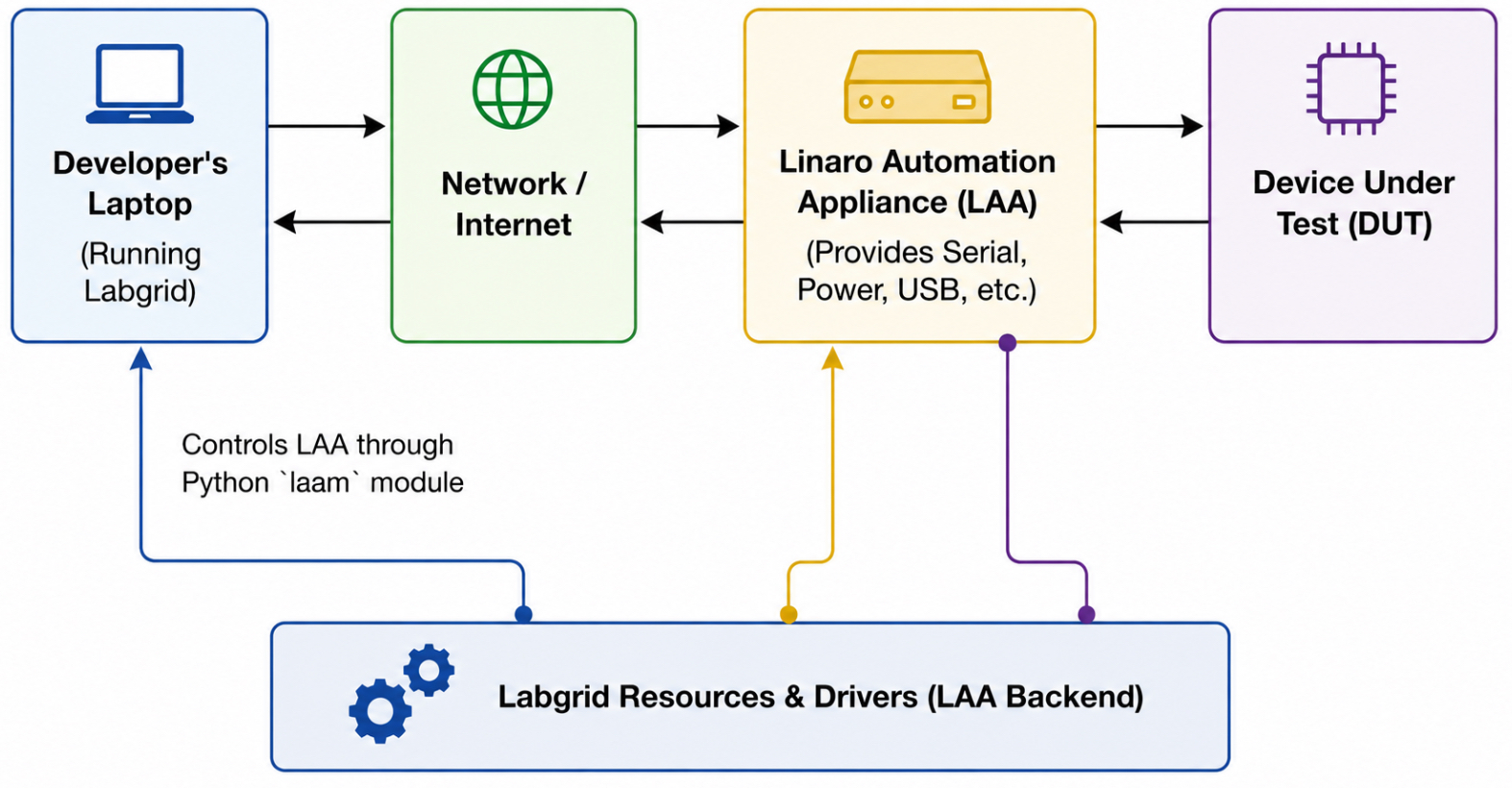
Caption: Figure 1: High-level architectural overview of Labgrid controlling a Device Under Test (DUT) via the Linaro Automation Appliance (LAA), streamlining local and lab-based test automation workflows.
What is labgrid?
Labgrid is a test automation framework for embedded Linux. It controls boards (power, serial, USB) and runs tests on them. You describe the hardware in a YAML file and labgrid provides drivers to control it.
Labgrid has a resource/driver model:
- A resource describes the hardware.
- A driver controls it.
Adding a new backend means adding new resources and drivers. This is how we added LAA support.
Labgrid is used for kernel testing, BSP validation and CI. It supports local serial ports, remote via SSH, and lab hardware like PDUs and USB hubs.
What is LAA?
The LAA is a fully integrated Embedded Device testing appliance. The LAA provides everything needed by most hardware automation tasks while also allowing to share DUTs with remote users and customers. In practice, one LAA controls one board. It gives you serial, power control, USB, and file storage over the network. You can put it next to a board on your desk and run automated tests from your laptop, without shared lab infrastructure.
What we added to labgrid
The LAA backend follows labgrid’s resource/driver model. Each LAA function gets its own resource and driver pair. We did not add a special-case backend. This way LAA labgrid resources work like any other labgrid resource and can be combined with existing drivers like ShellDriver.
The resources:
- LAASerialPort — serial console via LAA WebSocket
- LAAPowerPort — power rails with on/off/cycle sequences
- LAAUSBPort — USB port switching
- LAAButtonPort — virtual buttons (power, reset)
- LAALed, LAATempSensor, LAAWattMeter — monitoring
Each resource has a matching driver. The drivers use the laam python module to talk to the LAA. The laam import is lazy so labgrid works without laam installed if you do not use LAA.
Multiple resources with the same laa_identity share the same laam session. This avoids opening multiple connections to the same LAA.
Labgrid LAA Examples Repository
We also have an example repository. It shows how to use Labgrid with LAA in practice. The repository includes example configs, helper scripts, and test setups for real boards such as Raspberry PI 4. It also shows how to deploy boot artifacts and run tests like LTP and Kselftest. This makes it easier to get started and to see how the different places fit together in a real setup.
Boot strategy
The board needs U-Boot with network boot support. TFTP was chosen because LAA already has a built-in TFTP server and this matches how LAVA boots boards as well.
LAAStrategy boots a board via TFTP from U-Boot:
- Power off, enable USB gadget mass storage with boot.img
- Power on, wait for U-Boot autoboot
- Interrupt autoboot
- DHCP, set TFTP server IP
- Load kernel, DTB and initramfs via TFTP
- Set bootargs and boot
Boot config comes from the YAML file but environment variables override it. You can switch kernel or initramfs per run:
git clone https://gitlab.com/Linaro/lava/appliance/labgrid-laa-examples
cd labgrid-laa-examples
KERNEL=Image.gz INITRAMFS=initramfs-6.19-ltp.cpio.xz.uboot \
uv run run_test.py -c "cd /opt/ltp && kirk -f ltp -r smoketest"uv is a Python package manager and runner. kirk is the LTP test runner.
Running tests
In the example repository, run_test.py boots the board and runs tests over serial. The flow is:
- Boot the board using LAAStrategy
- Run a command or test definitions on the board
- Look for result.txt on the board
- If no result.txt, try to parse TAP format from console output
- Print a summary with pass/fail/skip counts
The two modes:
-druns a test-definitions YAML via test-runner.py on the board. test-definitions is a collection of test scripts from Linaro-cruns a command directly
LTP example
KERNEL=Image.gz INITRAMFS=initramfs-6.19-ltp.cpio.xz.uboot \
  uv run run_test.py -c "cd /opt/test
-definitions/linux/ltp && ./ltp.sh -T smoketest -s true -i /opt/ltp"
kselftest example
KERNEL=Image.gz INITRAMFS=initramfs-6.19-kselftest.cpio.xz.uboot \
  uv run run_test.py -c "cd /opt/test-definitions/linux/kselftest && ./kselftest.sh -p /opt/kselftest/default-in-kernel/ -c arm64 -s true"
Building test artifacts with bootforge
To test a kernel you need a few things: the kernel image, a DTB, and an initramfs with a rootfs and test tools. Building all of this by hand is tedious. Bootforge automates it. Bootforge is a separate helper project that automates this. It is not part of labgrid. It builds kernel and initramfs artifacts for ARM64 boards. It uses tuxmake for kernel builds and podman for the rootfs. It can also download pre-built kernels from URLs instead of building from source.
It supports two boot modes. NFS boot creates a small initramfs that mounts rootfs over NFS. Ramboot puts the full rootfs in the initramfs so the board runs from RAM with no network needed.
Build kernel from source
make kernel KERNEL_SRC=~/src/linuxBuild kernel with kselftest
make kernel KERNEL_SRC=~/src/linux KSELFTEST=1 KSELFTEST_TARGETS=arm64Download pre-built kernel
make kernel KERNEL_URL=https://storage.tuxsuite.com/.../Image.gzBuild ramboot initramfs with LTP
make RAMBOOT=1 KERNEL_SRC=~/src/kernel/linux/ KERNEL_VERSION=6.19 ROOTFS_TAR=https://storage.tuxboot.com/debian/trixie/arm64/rootfs.tar.xz TESTDEFS_URL=https://github.com/Linaro/test-definitions/releases/download/2026.02.01/2026.02.tar.zst OVERLAY_URL=https://storage.tuxboot.com/overlays/debian/trixie/arm64/ltp/20250930/ltp.tar.xz kernel initramfsBuild
Deploy artifacts
deploy_artifacts.py uploads files to the LAA TFTP storage:
uv run deploy_artifacts.py boot.img
uv run deploy_artifacts.py Image.gz bcm2711-rpi-4-b.dtb
Example YAML
A target config for RPi4 on LAA:
imports:
  - laastrategy.py

targets:
  main:
    resources:
      - LAASerialPort:
          laa_identity: "laa-00175"
          serial_name: "ttymxc3"
      - LAAPowerPort:
          laa_identity: "laa-00175"
          power_on:
            - ["3v3", "on"]
            - ["5v", "on"]
          power_off:
            - ["3v3", "off"]
            - ["5v", "off"]
          power_cycle:
            - ["3v3", "off"]
            - ["5v", "reset"]
            - ["3v3", "on"]
      - LAAUSBGadgetMassStorage:
          laa_identity: "laa-00175"
          image: "boot.img"
      - LAAUSBPort:
          laa_identity: "laa-00175"
          usb_ports: [1, 2]
      - LAAButtonPort:
          laa_identity: "laa-00175"
          buttons: ["power", "reset"]
      - LAALed:
          laa_identity: "laa-00175"
      - LAATempSensor:
          laa_identity: "laa-00175"
      - LAAWattMeter:
          laa_identity: "laa-00175"
      - LAAProvider:
          laa_identity: "laa-00175"
    drivers:
      - LAAPowerDriver:
          delay: 2.0
      - LAASerialDriver: {}
      - LAAUSBGadgetMassStorageDriver: {}
      - LAAUSBDriver: {}
      - LAAButtonDriver: {}
      - LAAWattDriver: {}
      - LAATempDriver: {}
      - LAALedDriver: {}
      - LAAProviderDriver: {}
      - ShellDriver:
          prompt: 'root@.*# '
          login_prompt: ' login: '
          username: 'root'
      - LAAStrategy:
          tftp_server: "198.18.0.1"
          kernel: "Image"
          dtb: "bcm2711-rpi-4-b.dtb"
          initramfs: "initram/ramdisk-v2.cpio.xz.uboot"
          kernel_addr: "0x00200000"
          dtb_addr: "0x08000000"
          initrd_addr: "0x10000000"
          boot_cmd: "booti"
          bootargs: "rdinit=/lib/init root=/dev/ram0 earlycon=uart,mmio32,0xfe215040"
Now you can use LAA in Labgrid
The LAA support is already merged into the main Labgrid project, see here. This means you can start using it today.
Here is what we added:
- New drivers and resources: We added support for serial ports, power control, USB and sensors.
- Easy to install: You can get everything by running `pip install labgrid[laa]`.
- Testing and docs: We wrote tests to make sure it works well and added instructions in the Labrid documentation.
If you want to see how it works, we have an example repository. There you can find test scripts for LTP, and kselftest on a Raspberry Pi 4. Feedback is welcome.
Explore our full technical guide to the LAA in the Linaro Hub Documentarion Library. Stay updated on the latest test automation strategies on the Linaro Blog. Visit the Linaro Solutions Hub. to manage your testing resources and view integrated solutions with your partners and upstream.
About the Author
Anders Roxell is a Linux kernel engineer at Linaro. He works on kernel build and test workflows, platform validation, and test automation. He contributes to KernelCI and TuxSuite, with a focus on making Linux kernel testing easier to run across developer systems and lab infrastructure.