


The latest Linaro Automation Appliance release lets existing Labgrid-based labs participate in KernelCI without deploying or maintaining a LAVA server, making it easier than ever to contribute hardware testing capacity.
TL;DR
- The Linaro Automation Appliance (LAA) now runs KernelCI jobs through Labgrid as well as tuxrun.
- Labgrid labs can contribute boards to KernelCI without deploying or operating a LAVA server.
- The Labgrid environment files and pytest tests a lab already has become the test infrastructure; results return to KernelCI as JUnit XML.
- Reproducing a CI failure is the same pytest command, run by hand at the bench.
Introduction
KernelCI depends on hardware labs around the world contributing testing capacity. Until now, joining that ecosystem typically required deploying and maintaining a complete LAVA infrastructure, a significant barrier for many organisations already using Labgrid.
The latest LAA release removes that obstacle. Existing Labgrid-based labs can now execute KernelCI jobs directly using their current workflows, without installing or operating a LAVA server.
The pull-lab model
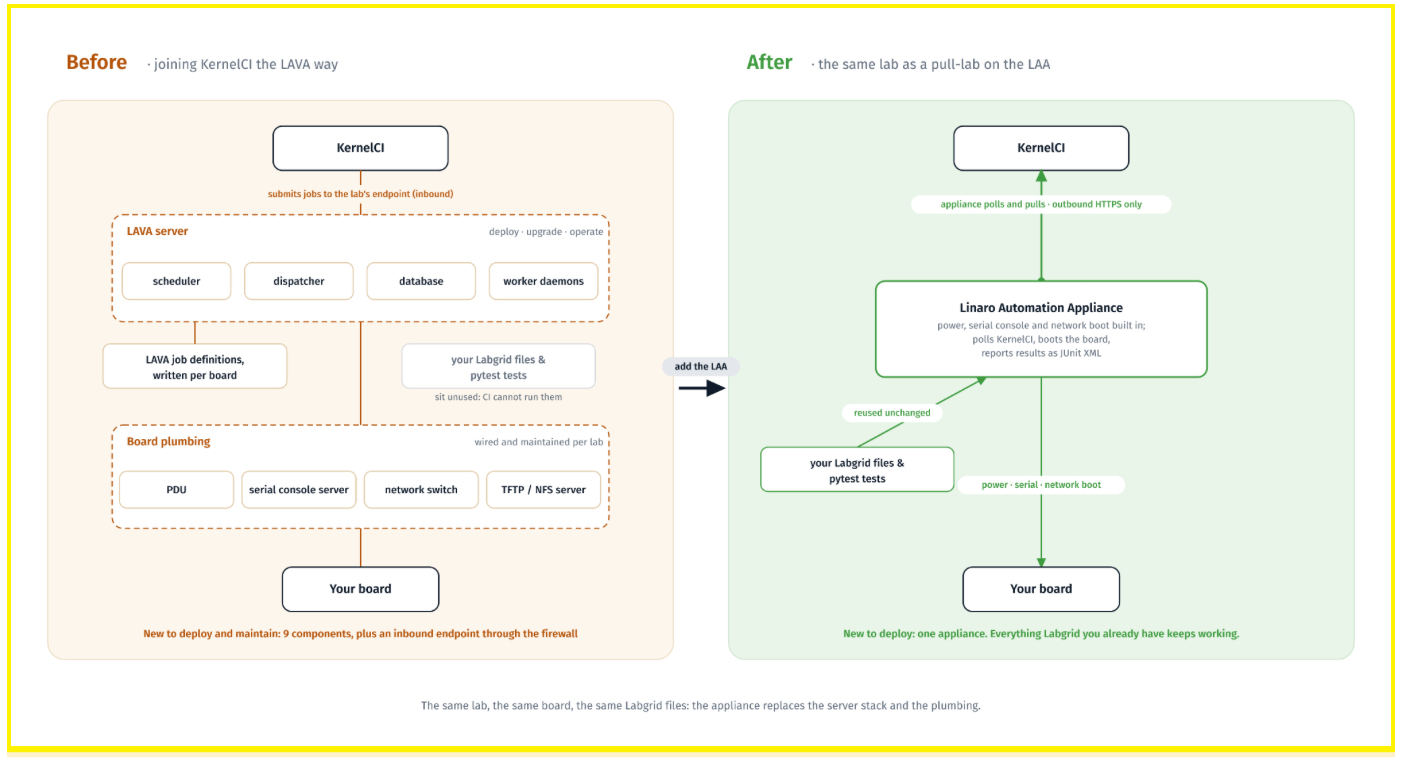
KernelCI’s value comes from breadth: more hardware platforms running more tests means more regressions caught. That breadth depends on labs volunteering their boards, and traditionally the price of admission was a full LAVA server, with its scheduler, dispatcher, database and worker daemons, to be installed, upgraded and debugged.
The LAA and the pull-lab model remove that at two different layers. The appliance itself provides power control, serial access and network boot directly, so those are not separate services to deploy. The pull-lab model then removes the automation stack above them: no server to run, no scheduler to operate, no database to back up. The scheduling has not gone away, it has moved; KernelCI does it, and the lab stops hosting it. The appliance polls KernelCI for work, downloads the kernel and root filesystem, deploys to the board, runs the tests and reports back.
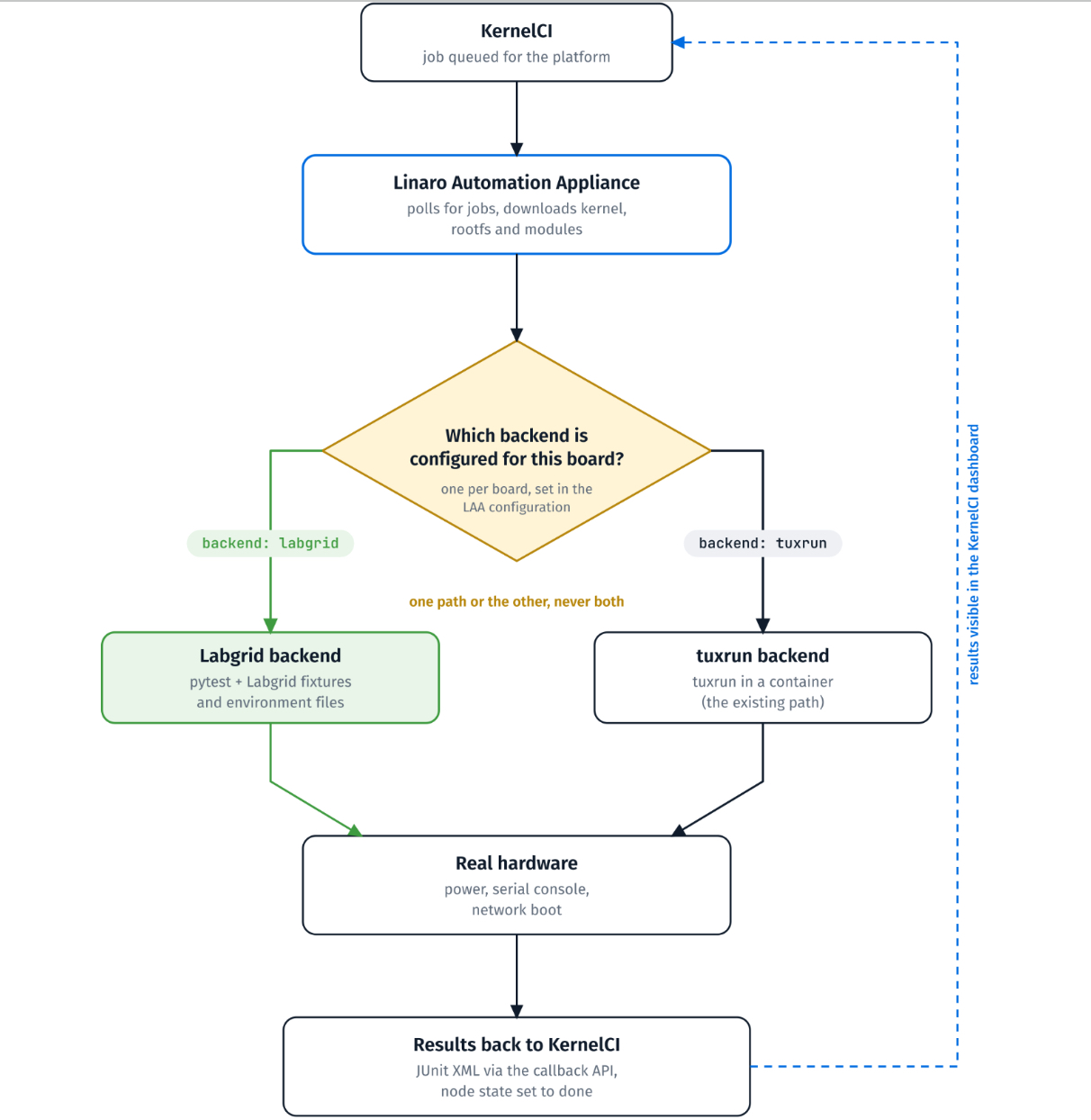
The flow it shows: a KernelCI job is queued; the Linaro Automation Appliance polls for it, downloads and deploys; it routes to the configured backend, either Labgrid using pytest fixtures or tuxrun; that drives real hardware over power control, serial console and network boot; results return to KernelCI as JUnit XML via the callback API.
The appliance is the execution layer. Labgrid and tuxrun are interchangeable from KernelCI’s side: the same job goes in and the same result format comes back, whichever one ran it.
Legacy KernelCI LAVA vs Pull Labs LAA
What a lab has to build to operate each model
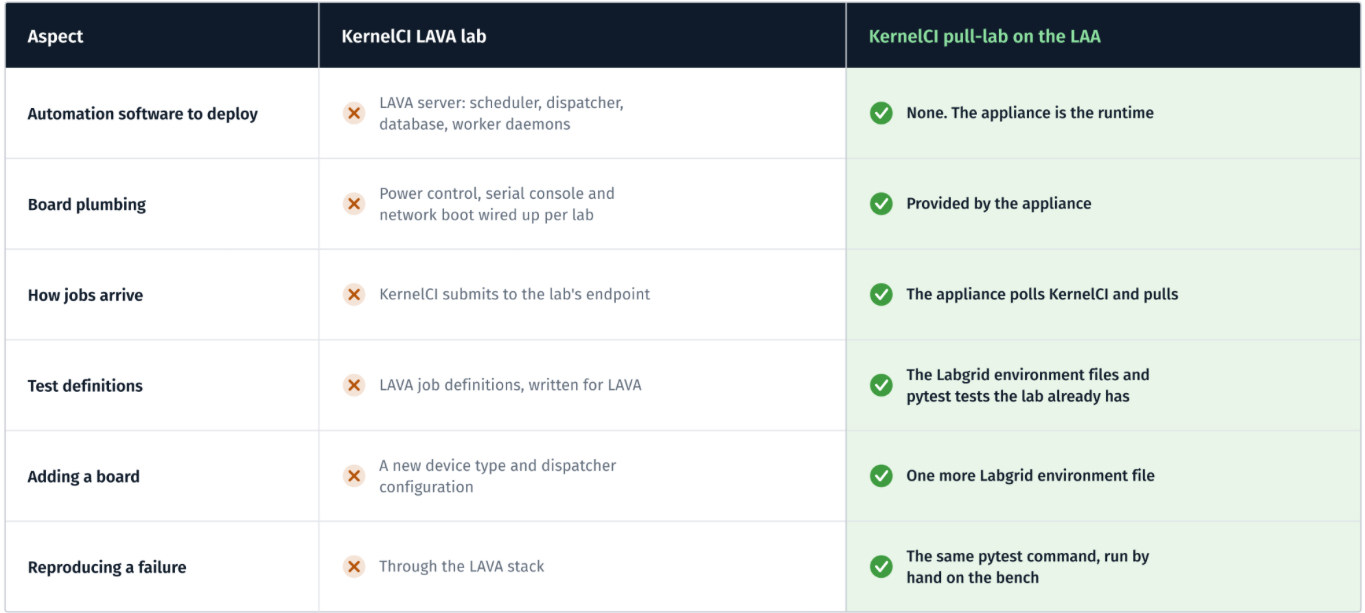
The same boards, contributed two ways.
What runs on the board
Labgrid is now a first-class executor backend alongside tuxrun, and a job is routed to one or the other by configuration. The two are not alike underneath. tuxrun generates LAVA job definitions and executes them in a container, so LAVA machinery still does the work on that path, even though no lab operates a LAVA server. The Labgrid path instead runs pytest with Labgrid fixtures directly against the board, producing standard JUnit Extensible Markup Language (XML) results. That is a natural fit, because Labgrid already integrates with pytest, so the execution model matches how Labgrid users already work.
From the operator’s side, a board needs two things, both of which a Labgrid lab will recognise. The first is a device environment file: the standard Labgrid YAML Ain’t Markup Language (YAML) file describing power control, serial console and shell access. The second is test definitions: pytest files that run against the booted board. Boot verification ships with the appliance.
Boot is only the starting point, though. Anything beyond it comes from test-definitions, the repository of test scripts used across the kernel testing ecosystem, which wraps established suites such as the Linux Test Project (LTP) and kselftest. tuxlava holds the catalogue that maps a KernelCI test name to the right script, arguments and timeouts; it is also what tuxrun uses to generate those LAVA job definitions. So when a job asks for ltp-smoketest, the appliance resolves the name through tuxlava, provisions test-definitions into the root filesystem, and runs it on the board. The same suites that run on LAVA-backed labs run here.
A real job: LTP smoke on an Orion O6
Concretely: the appliance picks up a KernelCI job targeting a CD8180 Orion O6, running Linux 6.19.0-rc8 on Arm 64-bit (arm64), asking for ltp-smoketest.
It downloads the kernel, modules and root filesystem, provisions test-definitions, then uses Labgrid to power-cycle the board, drive Grand Unified Bootloader (GRUB) over the serial console, and boot over Trivial File Transfer Protocol (TFTP) with a Network File System (NFS) root. Once a shell comes up, Labgrid’s pytest fixtures hand over to the test runner, and LTP runs on the device under kirk, its own runner:
Suite:       shardfile
Total runs:  12  |  Passed: 408  |  Failed: 1  |  Skipped: 3  |  Broken: 1
Runtime:     15.717s
Kernel:      Linux 6.19.0-rc8 (aarch64, debian 13)
In this case, for the Orion-o6, the board booted in three minutes and the smoke suite finished in about 25 seconds. Results go back to KernelCI over the callback Application Programming Interface (API), the node moves to done with a pass or fail, and it appears in the dashboard next to every other lab. That is the same state machine LAVA-backed jobs use, so regressions are tracked and bisected identically no matter which backend produced the result.
Debugging is the same tooling you already use
The appliance records every job it processes and can re-run any of them by node identifier, re-fetching the definition from KernelCI and executing it again on the same board. That covers the flaky-failure case.
Where Labgrid adds something extra is on the bench. Because device interaction is plain pytest fixtures and plain YAML, an operator can run the same command by hand, against the same environment files the appliance uses in production. For a lab that already uses Labgrid day to day, there is no context switch between continuous integration and hands-on debugging. It is one set of tools.
If you run a Labgrid lab and want to try this, start with KernelCI’s connecting a pull lab guide, which covers the pipeline side: runtime entries, scheduler setup, job definitions, tokens and deployment. Its worked example runs tuxrun against QEMU rather than Labgrid against a board, so read it for the protocol and take the Labgrid backend configuration from the appliance’s own documentation.
Getting Started
- Ready to connect your Labgrid lab? Follow KernelCI’s connecting a pull lab guide for the pipeline side, then enable the LAA’s Labgrid backend and point it at the environment files you already have. Your boards start pulling KernelCI jobs; nothing else to deploy.
- Struggling to get your platforms tested in KernelCI? Linaro can design, configure and operate the whole path for you: an appliance next to each board, Labgrid or tuxrun as the backend, and results in the KernelCI dashboard. Get in touch with Linaro.
About the author
Benjamin Copeland is a Senior Tech Lead at Linaro, working in automation and continuous integration for the Linux kernel.
He chairs the Technical Steering Committee (TSC) for KernelCI and leads Linaro’s KernelCI team, where the work is aimed at the long-term stability of the kernel: the pipelines that build and boot it, the labs that contribute the hardware it is booted on, and the tooling in between. He has written on automating bisection in KernelCI, and on Linaro’s transfer of Tuxmake, TuxRun and TuxLava to the project.