


TL;DR
Real-hardware CI is valuable, but building and maintaining the hardware automation around each Device Under Test (DUT) is difficult:
- Testing detects bugs that would cost 100 times more to fix if part of a release
- Testing on real hardware is required to ensure your software works on the hardware your customers will use
- Building a test lab is costly and time-consuming
- We built the Linaro Automation Appliance so you can build stable and scalable testing labs
- Attaching new HW is hard to predict and thus risky, taking anywhere from 3 hours to 3 months,
This post explores the challenges of real-hardware testing and introduces the Linaro Automation Appliance as a solution.
The cost of bugs
Every time you release and deploy a new version of your software, you are also shipping bugs and regressions that will require fixes and deployments in the future.
Someone will discover those bugs in your software. If you are lucky, most bugs will be discovered by your developers. But in many cases, they will be found by:
- Users, who will lose faith in your products
- Security researchers, who will ask for bug bounties
- Hackers, who will sell the findings to bad actors
Unless you find and fix the bugs yourself, every bug found in released software will cost your company:
- Operational cost to fix and deploy
- Degrading your reputation
- Creating legal exposure (think of the CRA)
Under impending legislation like the European Cyber Resilience Act (CRA), manufacturers are legally obligated to ensure the security of products with digital elements throughout their lifecycle. Failing to catch regressions early doesn’t just mean fixing a bug; it exposes your organization to severe regulatory risk, potential fines, and mandated product recalls if vulnerabilities are deployed to production.
A reliable testing infrastructure is no longer just a technical nice-to-have; it is a critical component of CRA compliance and risk mitigation.
Testing is a cost saver
Multiple studies have shown that fixing a bug deployed to production is 100 times more expensive than when caught by testing during the development phase [1,2,3]. The later you find a bug, the more expensive it usually becomes to fix. If you catch it during development, you mainly fix the code. If you catch it in production, you may also need to fix data, operations, and customer issues.
That’s why most projects and companies are adding automatic testing (often called CI) to their software and product processes.
But testing is not easy and can be expensive if not targeted properly.
Virtual vs Real hardware
To test your software, you have two main options:
- Testing on virtual hardware: containers, virtual machines, QEMU, Fixed Virtual Platforms (FVP)
- Testing on the actual hardware
Testing on a virtual device is cheap, easy to use, and scales with the number of CPUs your server offers. But it does not exercise the software the way it will run in your customer’s hands, and it is likely to miss bugs that only the real hardware triggers.
For this reason, you should test your software on both virtual hardware and the actual hardware that will run it in the real world.
Testing infrastructure
To test your software on real hardware you will need two components:
- A software harness: decide what to run and interprets the results
- A hardware harness: makes the board do what the software harness asked
The first is a program. The second is electricity, cables and connectors, and it is the one this post is about.
The Software harness
The software harness deploys the software under test to the device under test (DUT), boots it, runs the tests and collects the results. Several mature open-source options exist:
| Harness | Software to test | Architecture | Testing Community |
|---|---|---|---|
| Gitlab/Github | User space | Runner | |
| Labgrid | Firmware, Kernel, OS, user space | Single process | KernelCI, … |
| LAVA | Firmware, Kernel, OS, user space | On server, multiple workers | KernelCI, Onelab, Civil Infrastructure Platform, Automotive Grade Linux, … |
Depending on your exact use case and requirements, you have multiple reliable options for the software harness.
At Linaro, as the creator and maintainer of LAVA, we build most of our testing strategy around it. But we also maintain and use Labgrid for some projects.
The Hardware harness
The hardware harness is responsible for automating the DUT. It should be able to:
- Power on and off the DUT
- Press buttons on the DUT, as some boards boot only on button press
- Toggle DIP switches, for example to change boot media
- Access to the DUT serial
- Provide network services: DHCP, DNS, NTP, …
- …
All these features should be driven from a set of commands that the software harness can call.
Building a hardware harness is then a matter of combining several components:
| Function | Interface | Component |
|---|---|---|
| Power On/Off | ATX Power Supply | Managed relays |
| Jack Barrel | ||
| USB | Managed USB hub | |
| Serial (UART) | FTDI to USB | |
| Boot, Enter recovery, … | Press buttons / toggle dip switches | Managed relays |
| Network services | DHCP, DNS, NTP, TFTP, … | Switches and servers |
The worker is responsible for driving the different components, and usually controls around 5 to 10 boards.
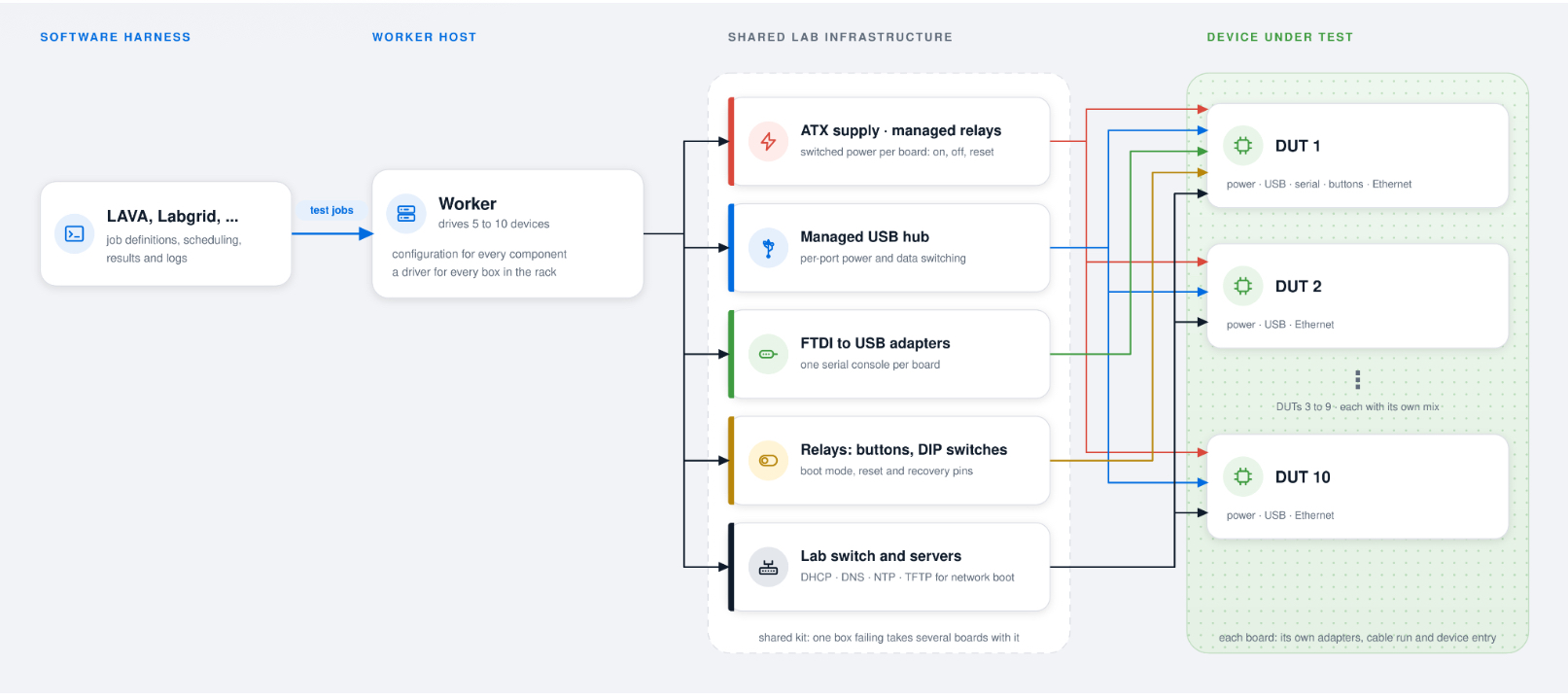
Every arrow below the worker is a loose cable, and every box is a separate product with its own firmware and its own way of failing. One worker sits above all ten boards, which is why its downtime makes ten boards unusable.
The hardware harness issues
For the engineer specifying a lab, that table above is the shopping list, and it is also the first sign of the problem: it is five products from five vendors, each with its own firmware, its own management interface and its own way of failing.
Two things go wrong, and they go wrong for different reasons:
The first is mechanical. The components are joined by loose cables, and loose cables come out. They come out when the rack vibrates, when the air conditioning cycles, and when a technician leans across the shelf to work on the board next to yours.
A connector that is nearly but not quite seated will pass a continuity check and still drop out under load, which is how a board boots on Tuesday, does not boot on Wednesday, and has had no change made to it in between.
The second is structural, and it is worse. A worker host typically drives 5 to 10 boards, so it is a critical component of the testing infrastructure. When it goes down, ten boards go down with it, and they stay down for as long as it takes someone to physically get to the rack. The same is true of the shared PDU and the shared USB hub above them.
A recent study based on internal KPIs at Linaro showed that maintaining such workers is costly, and that any failure on a worker makes multiple boards unusable for a long period of time. Moving away from a model with shared parts (PDU, USB hubs, …) improved the reliability of the overall testing lab.
Introducing the Linaro Automation Appliance
Linaro has been managing test labs for the last 15 years with up to 200 active boards. The labs used to make use of custom hardware harnesses described above.
After more than 15 years of battling against loose cables, moving parts, failing PDUs, bad USB hubs, … Linaro engineers decided to design and build the hardware harness we actually wanted: the Linaro Automation Appliance, a fully integrated embedded device testing appliance.
It is one box. It sits under one board and provides every automation function in that shopping list, with no cables between the parts.
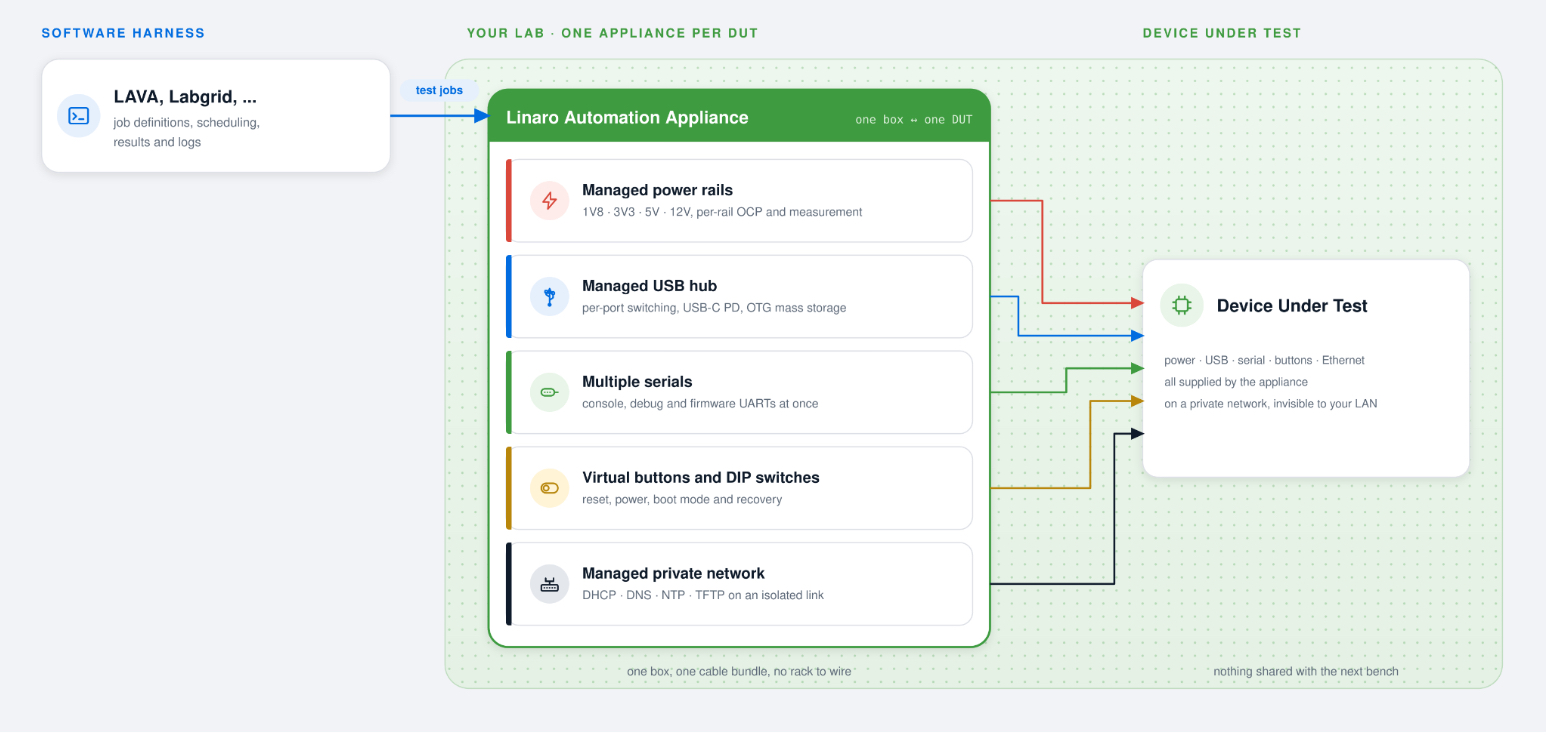
One appliance per DUT. Every component in the hardware harness table above
becomes one box, so there are no cables left between them, and the network
services stop at the appliance instead of reaching your lab network.
The design of the Linaro Automation Appliance revolves around:
- An all-in-one embedded device testing harness, providing every automation feature to test your software on your hardware
- A fully managed testing appliance for scalable deployment
- A fully isolated board for stable and reproducible tests
An all-in-one embedded device testing harness
The Linaro Automation Appliance comes with hardware features required to test most boards (see the #Hardware harness table above):
- Managed power rails (1V8, 3V3, 5V, 12V)
- Managed USB Hub
- Virtual buttons
- Multiple serials
- Managed private network with services dedicated to the board
- …
Thanks to this design, the Linaro Automation Appliance replaces PDUs, network switches, managed USB hubs and relays with one box, without any loose cables!
A fully managed testing appliance
The Linaro Automation Appliance (LAA) firmware is fully managed by Linaro with regular releases. The LAA firmware is a Yocto-based OS, using OSTree for Over-The-Air upgrades resilient to power outages.
Thanks to this firmware, every LAA in the fleet runs the exact same software and is always kept up to date. Compared to a traditional deployment, where lab administrators must upgrade the fleet of workers themselves, the LAA deployment is cleaner and more scalable.
In case of a software regression, the LAA firmware can be quickly reverted to the previously working version. This is critical for the stability of your testing lab, and often impossible with traditional deployments.
One appliance, one board, one private network
The appliance is designed one-to-one: one appliance drives one device under test, and it puts that board on a private network of its own that does not reach the lab network.
The design fully isolates boards from each other, so a misbehaving board cannot make tests running on another board fail.
When boards share infrastructure, they can affect each other, and a board that misbehaves, floods the network or wedges a shared USB controller can fail a test running on a different board entirely. Those failures are miserable to debug, because the evidence is in the wrong job’s logs.
A CI system that fails for reasons unrelated to the change under test is a CI system engineers learn to ignore.
Isolating each board removes that class of failure making your testing lab trustable again.
The hardware harness solution
Real-hardware testing earns its cost, and the Cyber Resilience Act is making it harder to avoid. But the reason a lab disappoints the people who funded it is rarely the testing. In a lab that tests on real hardware, the automation around the board fails more often than the software under test: the cable that works loose, the PDU that stops answering, the worker host whose failure takes ten boards down with it.
After about fifteen years of running testing labs, the conclusion Linaro reached was that the hardware harness should be one engineered product rather than five assembled ones. The Linaro Automation Appliance is that product: one box per device under test, firmware that can be rolled back, and a private network that keeps one board’s misbehaviour to one board.
Where to start
If you are building a lab, or already running one and recognise the failures above, start with the Linaro Automation Appliance documentation. It covers what the appliance does, which devices it already supports and how to get one, and then reach out to Linaro.
If the harness is not the part you want to own at all, Linaro’s Testing and Automation Services team designs, deploys and scales validation systems for embedded, cloud, mobile and infrastructure platforms, and can do the lab work with you rather than sell you the box.
About the Author
Rémi Duraffort is a computer engineer with 20 years of experience spanning multiple fields, from software and automation for embedded devices to cloud and scalable SaaS. A contributor to multiple Open Source projects, including VLC and v8, Rémi is the maintainer and technical leader of LAVA, the open source testing automation software developed by Linaro. In recent years, Rémi led the development of the Linaro Automation Appliance, a solution for automating embedded device testing, from firmware to user-space, on your own hardware.
References
[1] Barry Boehm, Software Engineering Economics (1981)
[2] IBM Systems Sciences Institute, “The Cost of Software Defects”
[3] National Institute of Standards and Technology (NIST), “The Economic Impacts of Inadequate Infrastructure for Software Testing” (2002)