

Introduction
As software-defined vehicles and industrial platforms move toward centralized compute architectures, developers increasingly need to run multiple operating systems—including Android, Linux and safety-certified RTOS—on the same hardware.
The challenge isn’t virtualization itself. It’s delivering a seamless user experience where applications from different operating systems appear together in a single interface without compromising isolation, safety, or performance.
The Challenge
Modern virtualization platforms can successfully run multiple operating systems on a single SoC. What remains difficult is creating a unified graphical user experience. Each guest OS typically manages its own display server and compositor, making it difficult to integrate application windows into a shared cockpit or industrial HMI.
Developers often end up:
- Duplicating UI layers
- Relying on screen streaming
- Accepting additional latency
- Sacrificing flexibility
This demonstration explores an alternative approach using open-source technologies that allow the host compositor to manage application windows directly. Watch the demo here.
Graphic Composition
Before anything appears on your screen, the operating system performs a process called graphic composition. It takes graphics from different applications, blends them, and creates a single image to show. On most modern Linux systems, this job is handled by Wayland server software, like GNOME or KDE Plasma.
For a VM, the monitor is actually a virtual display. This serves as a graphics buffer that the host compositor uses to render to the physical monitor. Inside the VM, its own compositor decides where its applications appear. But from the host’s point of view, the VM’s output is just a blank texture—the host only sees the final image the VM gives it, not what happens inside.
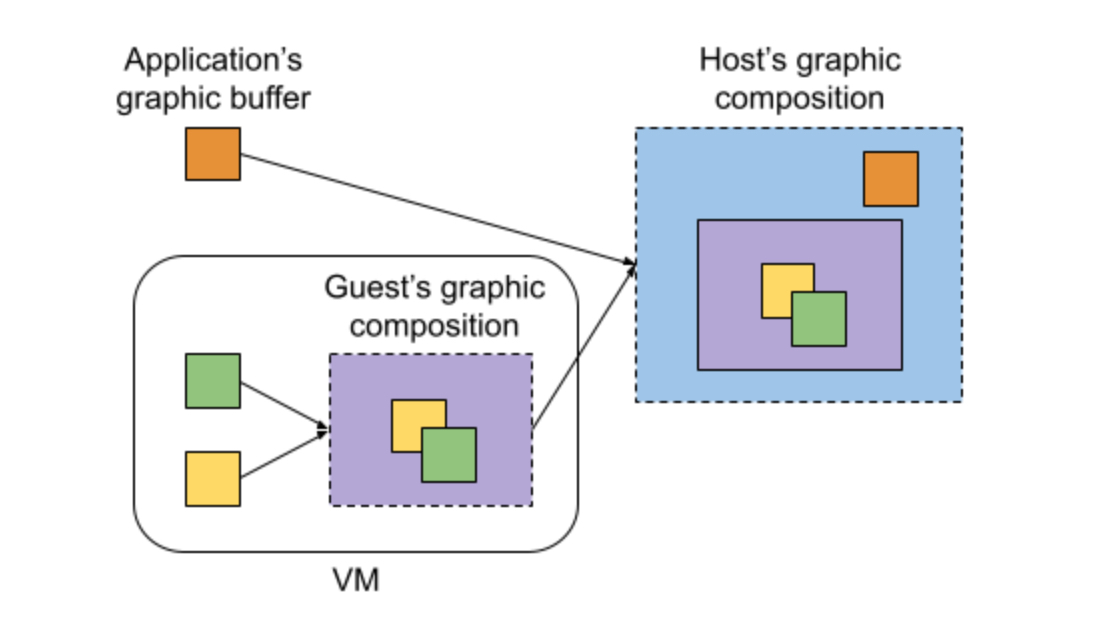
So how do we bridge the gap between virtualized apps and the physical display? The aim is to let the host’s compositor treat these virtual windows just like native ones, so they can appear smoothly alongside other host applications.
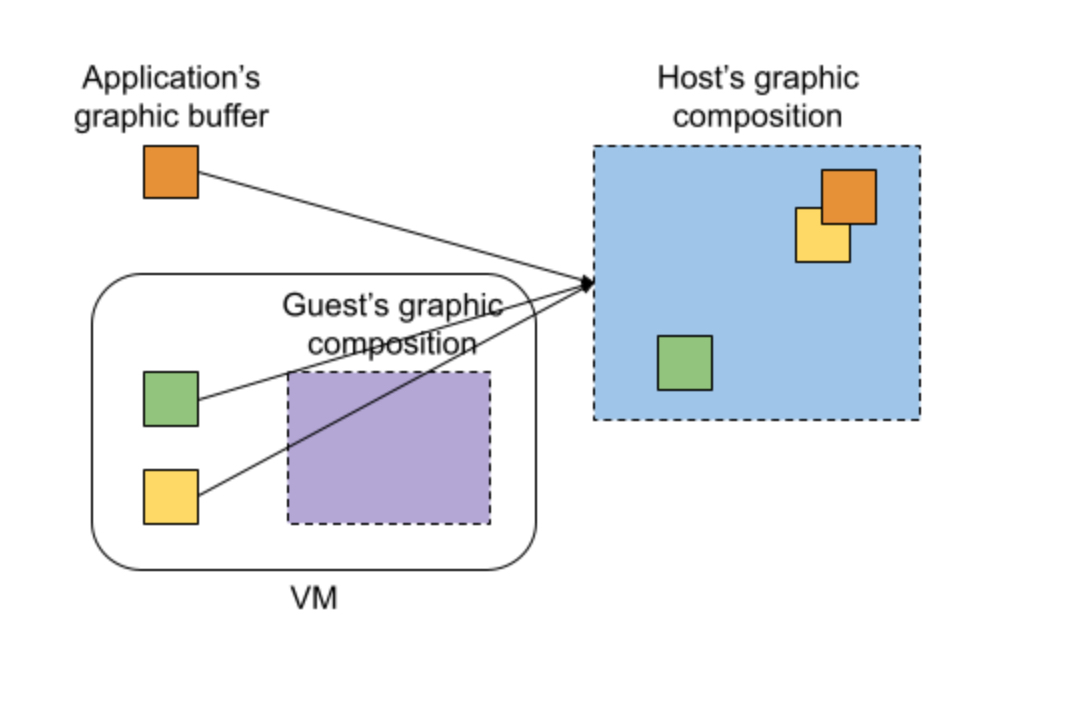
Core Technologies
To make host-based VM graphics composition work, we need to look at a few important open-source technologies that serve as building blocks.
Wayland
Wayland is a display server protocol supported by most modern Linux distributions and some other operating systems. It’s often seen as the successor to X11. Applications act as Wayland clients, communicating with the Wayland server (or compositor) and sharing information such as where their graphics buffers are stored. The compositor then builds the final image that gets shown on screen.
Because Wayland is simple and widely used, it’s the obvious foundation for this experiment.
Virtio-gpu
Virtio-gpu offers a VirtIO-based GPU and display controller, allowing VMs to efficiently share their graphics buffers with the host. It also supports creating a context, which lets it send command streams that wrap any messages.
Wayland messages are wrapped inside virtio-gpu commands and sent through the cross-domain context. The rutabaga_gfx library in the VM’s backend handles this, forwarding the messages to the host compositor—and it works in both directions.
Sommelier
Sommelier acts as a Wayland proxy for applications inside the VM. It sets up the virtio-gpu cross-domain context so that GUI apps in the VM can communicate with it. Sommelier relays Wayland messages between the guest and host, making the apps appear on the host’s desktop.
Waydroid
Waydroid is traditionally designed to run a full Android system inside a Linux container. But what’s really useful for VMs is that it brings Wayland support to Android, which normally doesn’t have it. By using this feature within an Android VM and connecting it to sommelier, Android apps running as guests can share their graphics buffers with the host compositor.
Waypipe
Waypipe offers a network remote proxy for Wayland clients. It would serve as an alternative method for relaying Wayland messages when the VM’s running on a remote host, or when the VM’s backend doesn’t support cross-domain, or maybe you’re simply not using virtio-gpu. Waypipe sends the graphics buffer over a socket—copying it from one place to another, which doesn’t sound very efficient. But it keeps things fast by only sending the differences from the previous frame, not the whole thing every time.
Architecture Overview
Bringing these technologies together lets us run a variety of guest operating systems and display their applications directly on the host’s desktop from inside VMs.
The system’s architectural design, which supports both Wayland and cross-domain context, is straightforward and requires minimal setup—especially on Linux with crosvm, a virtual machine monitor (VMM) similar to QEMU.
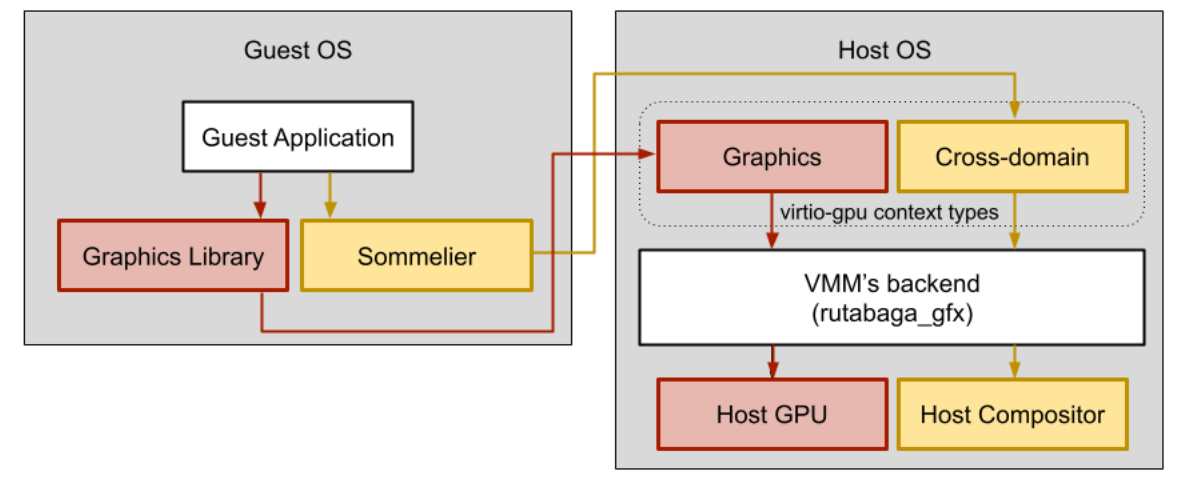
In the diagram above, the red arrow shows the flow of 3D graphics commands, while the yellow arrow traces the path of Wayland messages. When a guest system needs to render graphics, those requests pass through its graphics library (like Mesa), then move to the graphics context provided by virtio-gpu (such as virgl or venus), followed by rutabaga_gfx (the VMM backend implementation), and finally reach the host’s GPU. For Wayland messages, instead of going to the guest’s compositor, they’re sent to sommelier, then through the virtio-gpu cross-domain context, and ultimately to the host’s compositor. This approach lets the host compositor interact directly with guest applications, allowing their windows to be seamlessly integrated into the host desktop experience.
Some systems, like Android, don’t support Wayland by default, so special adjustments are needed. Android relies on SurfaceFlinger as its compositor, which isn’t compatible with Wayland. That’s why Waydroid is essential—it brings Wayland support to Android, and together with sommelier, lets Android apps display seamlessly alongside other guest applications on the host.
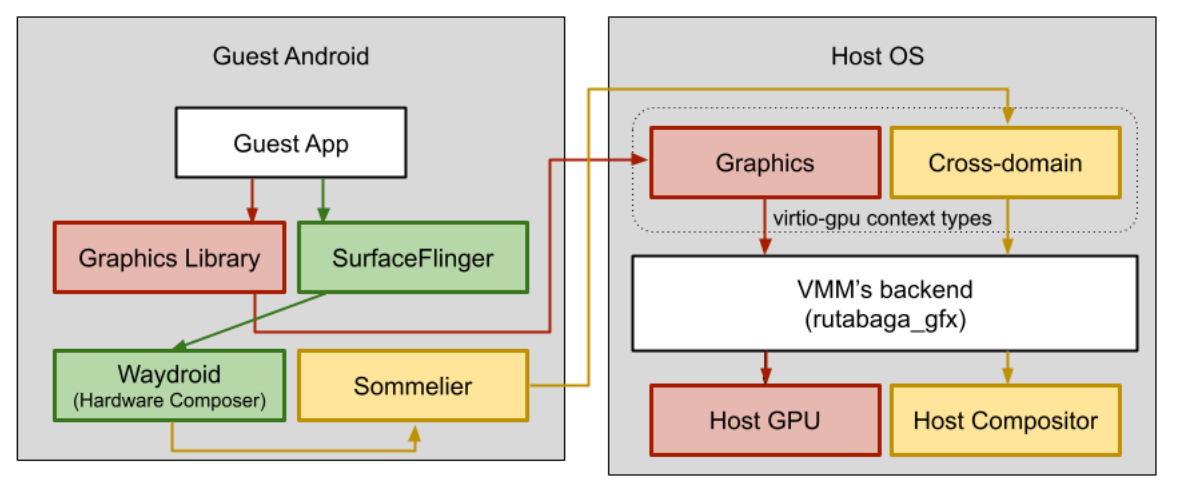
It takes a bit of work to get everything running smoothly, though. For instance, Waydroid was originally built for LineageOS and meant to run inside a Linux container, so it needs to be adapted for AOSP Cuttlefish. Likewise, sommelier has to be tweaked to build with AOSP’s Soong system.
Lastly, for VMs running on a remote host—or in setups where cross-domain context isn’t available—graphics output can be managed differently.
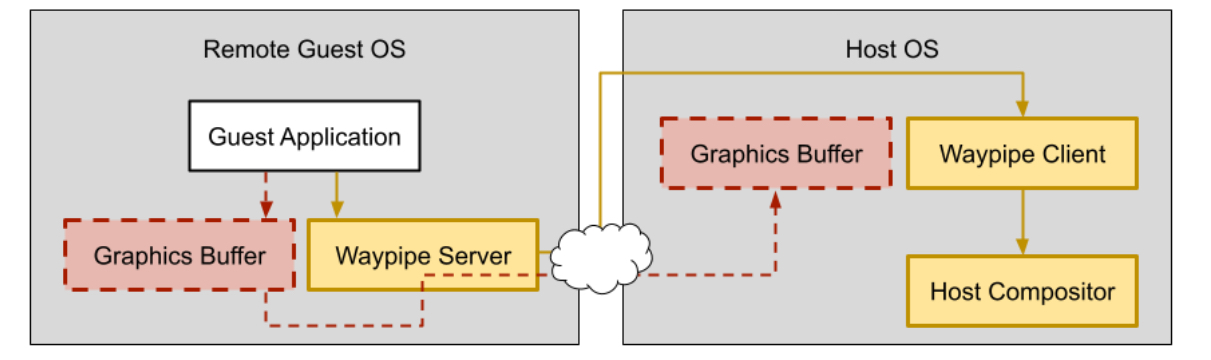
Waypipe keeps the guest’s graphics buffer in sync with the host and also forwards Wayland messages between them.
Why This Matters
- Lowers hardware cost through workload consolidation
- Enables independent lifecycle management for each OS
- Delivers a better user experience through unified graphics
- Supports software-defined vehicle architectures
- Leverages open source technologies
See It in Action: The Demo
The following demonstration shows applications running simultaneously from:
- Android
- Debian Linux
- QNX
Each operating system runs independently inside its own virtual machine while appearing as native application windows managed directly by the host compositor. This illustrates how centralized compute architectures can deliver a seamless user experience without sacrificing workload isolation. Watch the demo here.
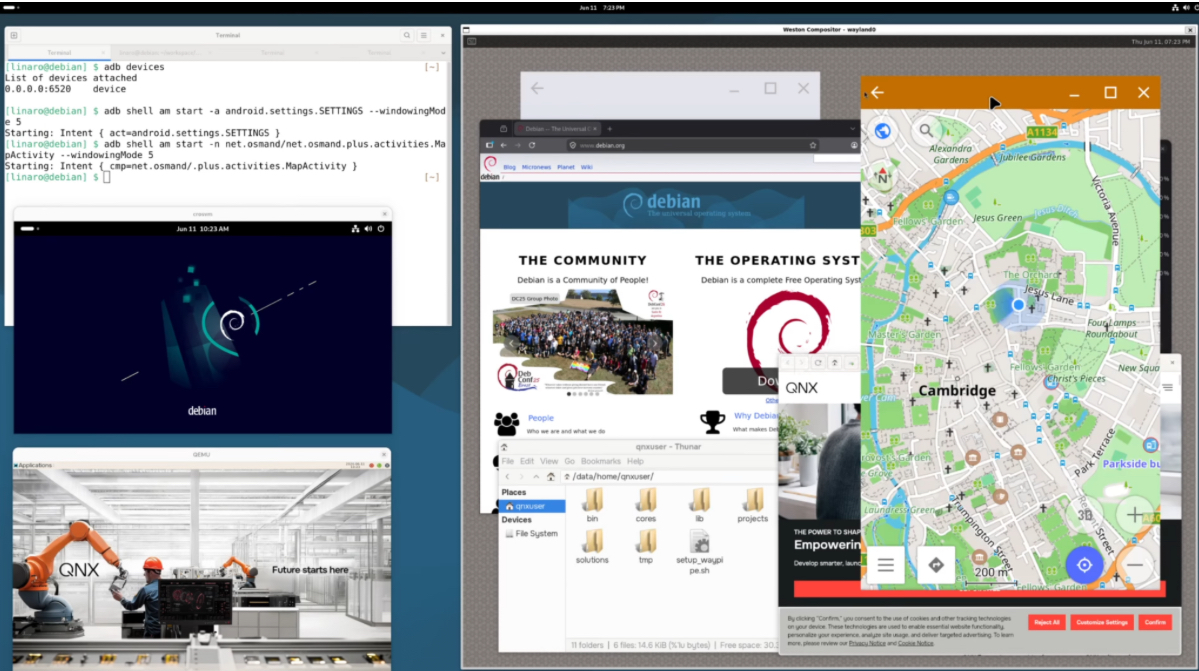
But the real value of this experiment isn’t just having all the guest app windows appear together. What’s powerful here is that the host compositor can directly control each guest application window—its appearance, position, and how it fits with other elements. For example, the compositor can mask or clip app windows so they blend seamlessly into custom UI layouts, like shaping a speedometer window to fit perfectly alongside other dashboard widgets.
This proof of concept demonstrates Linaro’s expertise in integrating virtualization, graphics and open-source technologies across multiple operating systems. It reflects the type of engineering work we help customers deliver for software-defined vehicles, industrial automation, and embedded platforms.
Conclusion
Unified graphics is becoming a key requirement for centralized compute architectures. By combining established open-source technologies in innovative ways, this proof of concept demonstrates a practical approach for integrating Android, Linux, and RTOS workloads into a single user experience.
Whether you’re building a next-generation digital cockpit, industrial HMI, medical devices, aerospace and defense platforms, edge AI systems, or robotics, Linaro can help accelerate virtualization, graphics integration and open-source enablement on ARM.
Interested in working with the engineers behind these upstream improvements? Contact Linaro to discuss how we can help accelerate your Linux platform development.
About the Author
Ryosuke Saito is an Embedded Systems and Kernel Engineer at Linaro, specializing in ARM architecture, virtualization, and low-level platform enablement. With over a decade of systems experience—including building Type-1 hypervisors on ARM, debugging kernel internals at Red Hat, and developing VirtIO device implementations in RTOS—his current work focuses on ARM board support, custom Yocto layer development, and Linux/RTOS integration. He has also contributed upstream patches to the Linux kernel, U-Boot, and Yocto projects.
👉 Co-contributor: Koudai Iwahori (Waydroid porting for AOSP Cuttlefish)