


Introducing Linaro Forge 26.1: catching Kokkos and MPI communication bugs
We’re excited to announce the release of Linaro Forge 26.1. This release brings two new features that we think will make a real difference to anyone working on modern HPC codes, whether you’re porting an application to GPUs or trying to understand why it doesn’t scale the way you hoped.
Kokkos View support in Linaro DDT. Kokkos has become one of the most popular ways to write a single code that runs well on CPUs and on GPUs from different vendors. Its central building block is the View, a multi-dimensional array that can live in host or GPU memory. Until now, looking at a View in a debugger meant digging through layers of template internals to find your data. DDT now shows Kokkos Views as the arrays you wrote, with their real dimensions. You can see them in the Locals panel, evaluate single elements, and open whole Views in the Multi-Dimensional Array Viewer, all while stopped inside a GPU kernel.
The MPI communication matrix in Linaro MAP. Every MPI code has a communication pattern: which ranks talk to which, and how much is communicated between ranks. MAP can now record how much data every rank sends to every other rank, how many calls it makes and how long they take, and draw it as a heat map. One look tells you whether your code is communicating the way you think it is.
In this release, Kokkos View support covers Kokkos 5.x with the CUDA backend, and the communication matrix covers communication on MPI_COMM_WORLD. Recording a communication matrix needs a licence that includes the feature, which comes with Forge Ultimate; you don’t need it to open a profile that already contains a matrix. Recording a communication matrix needs a licence that includes the feature. It comes with Forge Ultimate, but existing Forge Ultimate customers need a re-issued licence file to use it, so please email support@forge.linaro.com to request one. You don’t need the feature in your licence to open a profile that already contains a matrix.
Rather than just describe the features, we’d like to show you what they’re for. We took CloverLeaf, a well-known hydrodynamics mini-app with a Kokkos version, and introduced two small bugs of the kind that slip into real codes: one in a Kokkos kernel and one in the MPI communication. Neither bug crashes the program, and neither produces an error message. Both are found in a few minutes with DDT and MAP, and in this post we’ll walk you through how.
The setup
CloverLeaf solves the equations of compressible gas dynamics on a two-dimensional grid of cells. It’s small enough to understand, but it does the same kind of work as much larger production codes, which is why it’s widely used for benchmarking and for trying out new programming models. To run in parallel, CloverLeaf splits the grid into rectangular chunks, one per MPI rank. Each rank works on its own chunk, and on every step swaps a thin strip of cells along each edge, called the halo, with the ranks next to it.
Something doesn’t look quite right
Our test problem is a block of dense, hot gas in one corner of a 960 x 960 grid, which expands into the cooler gas around it over 200 steps, on 16 ranks. At the end of the run, CloverLeaf reports how much the total energy of the gas has changed:
Total energy change: -0.205541A small loss is normal here, because the numerical scheme isn’t perfectly conservative. Our previous build of the same problem lost 0.038. Losing more than five times as much energy is a sign that something in the physics has gone wrong. It’s exactly the kind of result that’s easy to overlook, so let’s find out what’s behind it.
Part 1: Kokkos Views in Linaro DDT
A 960 x 960 grid is far too big to inspect by eye, so the first thing we do is shrink the problem. We use a 32 x 32 grid with a square of dense gas in the middle, on 4 MPI ranks sharing the GPU. Each rank now holds a 16 x 16 chunk of the grid, plus a halo two cells deep on every side, so every field is a 20 x 20 Kokkos View. That’s small enough to read in full.
We start DDT from the job script with Reverse Connect. The job runs on the cluster as normal, and the debugging session opens in the Forge client on our laptop:
ddt --connect mpirun -n 4 ./kokkos-cloverleaf --file blog-sym.inStopping inside the GPU kernel
The energy depends on the pressure, and in CloverLeaf the pressure is calculated by the ideal gas kernel. It’s a two-dimensional Kokkos::parallel_for: Kokkos runs the body of the lambda once for every cell in the range it’s given, in parallel, on the GPU. We put a breakpoint on the first line inside the lambda and press play. All four ranks stop inside the kernel, on the GPU, and DDT shows us the source with the current line highlighted.
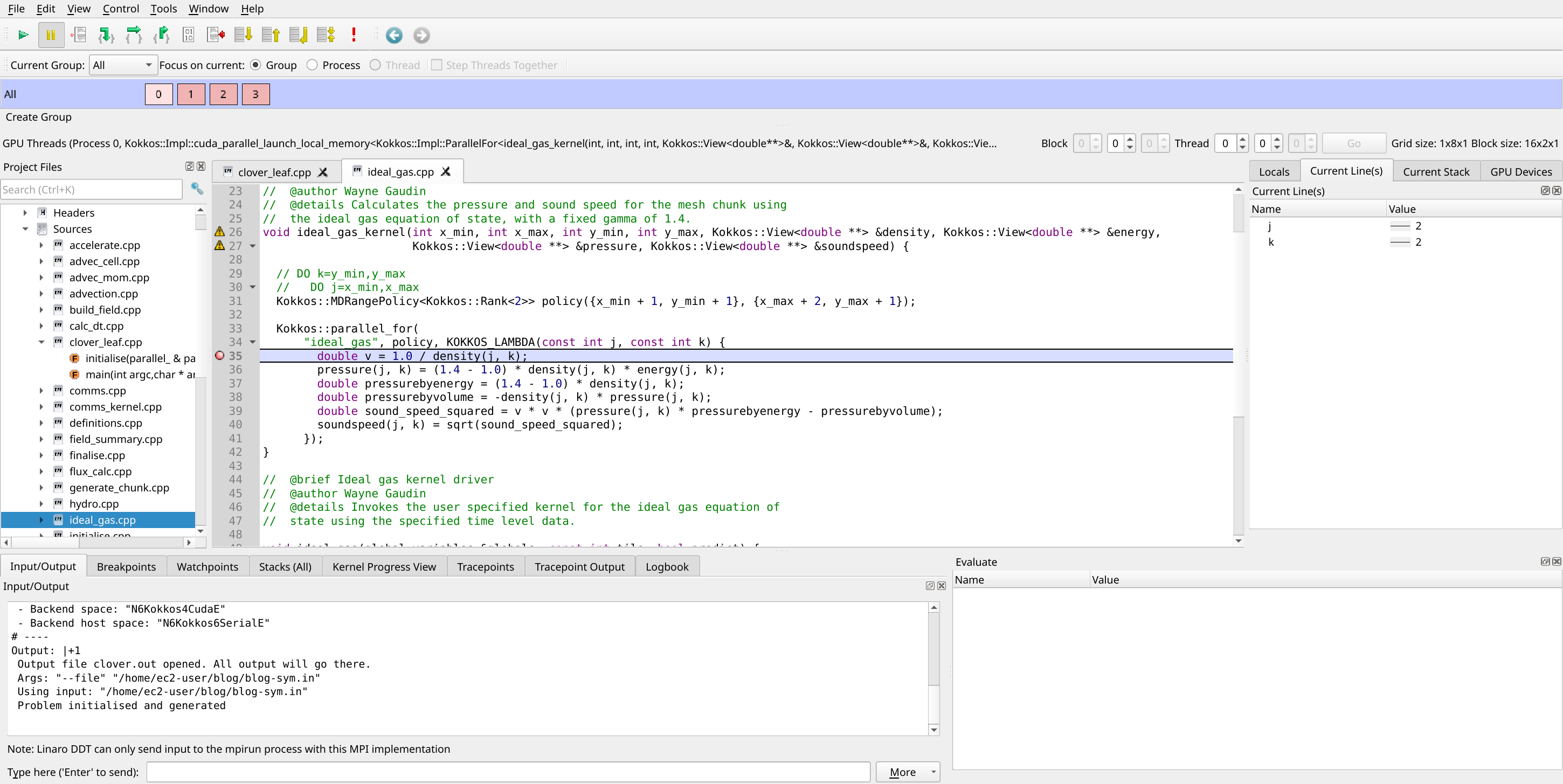
Stopped inside the ideal gas kernel on the GPU
Kokkos Views in the Locals panel
The Locals panel shows the variables the kernel can see. The lambda captures the fields it works on, and DDT lists each one, density, pressure, energy and sound speed, as a Kokkos::View<double[20][20]>. There are no Kokkos internals to wade through, just the array and its size, exactly as you’d think of it when writing the code.
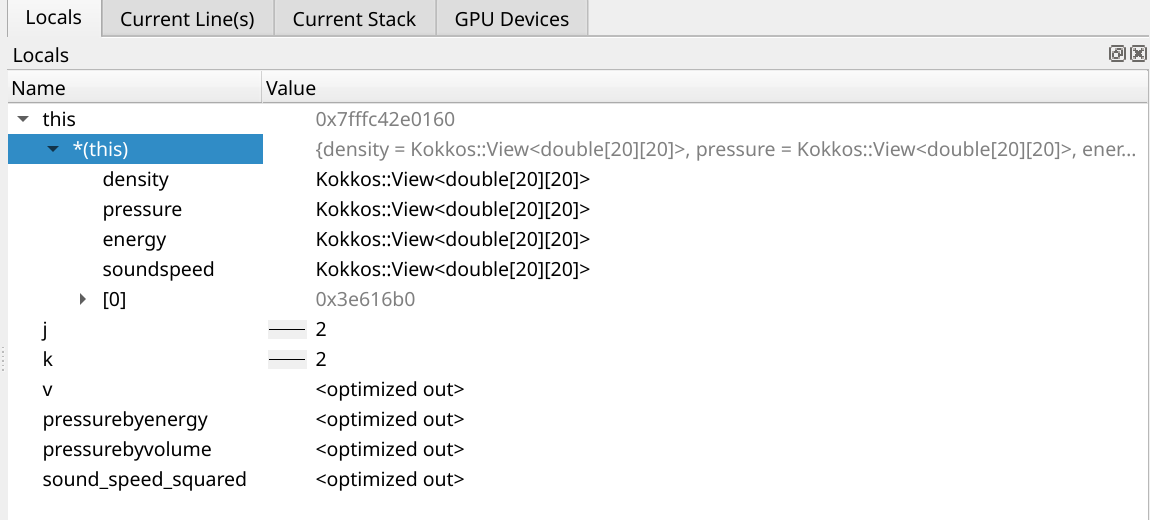
Kokkos Views in the Locals panel
The whole field in the Multi-Dimensional Array Viewer
Single values only tell us so much. To see the whole pressure field at once, we open the Multi-Dimensional Array Viewer (Tools > Multi-Dimensional Array Viewer) and enter pressure.at($j,$i). The $i and $j are the viewer’s loop variables, and .at() is how DDT stands in for a View’s usual round brackets. The View is 20 x 20, so we ask for 0 to 19 in both directions, and set the display so that the rows of the table are the rows of the grid.
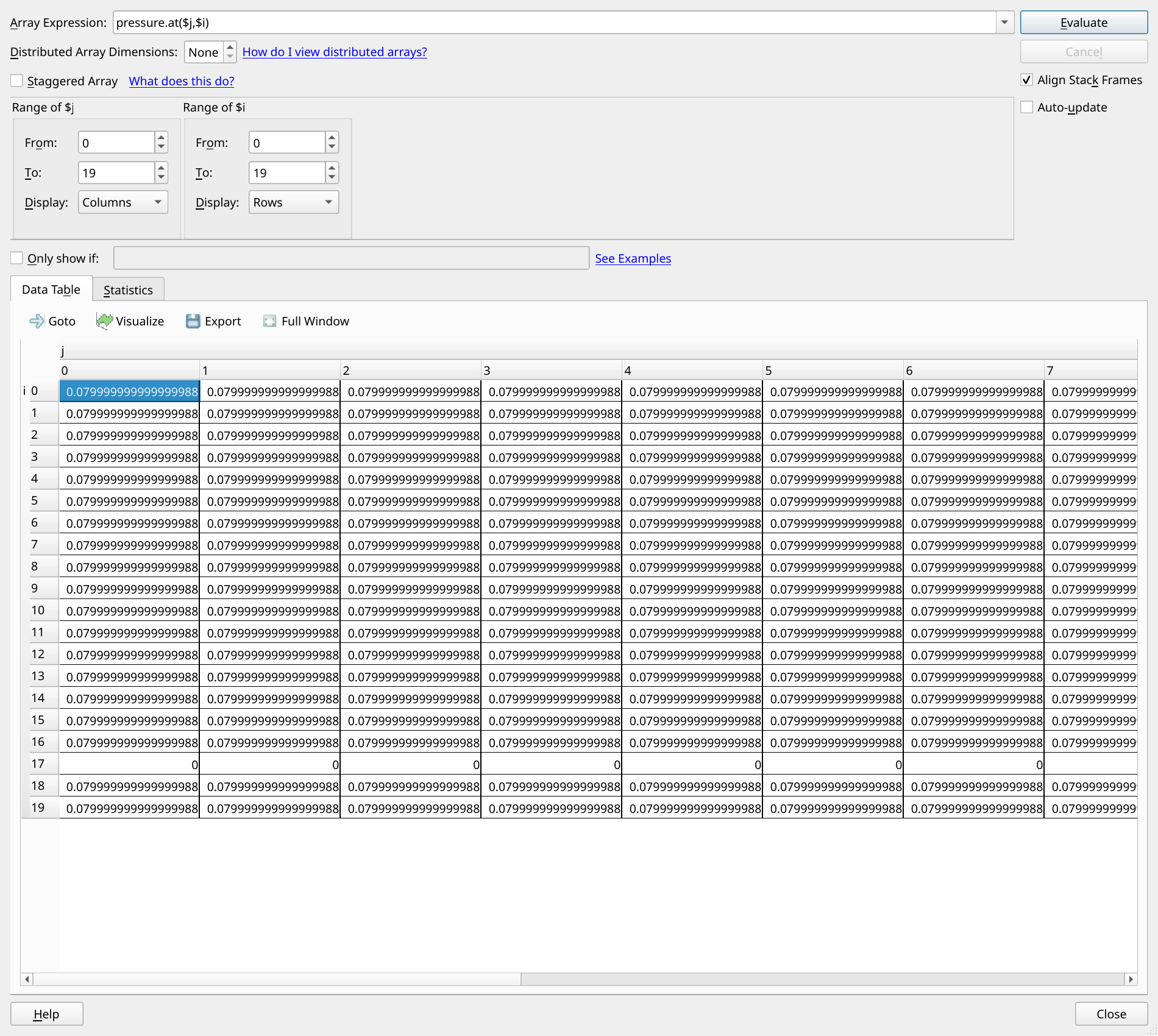
The pressure field: row 17 is all zeros
This is where the problem jumps out. Every row has a sensible pressure except row 17, which is zero all the way across. A gas with density and energy can’t have zero pressure, so something has gone wrong in that row. Row 17 is also significant: it’s the last row of real cells in this rank’s chunk, because rows 18 and 19 are the halo.
With a large array, a single odd row could easily hide among thousands of values. To be sure we haven’t missed anything, we tick Only show if and enter $value == 0. DDT now shows only the cells where the pressure is zero, and they are exactly that one row.
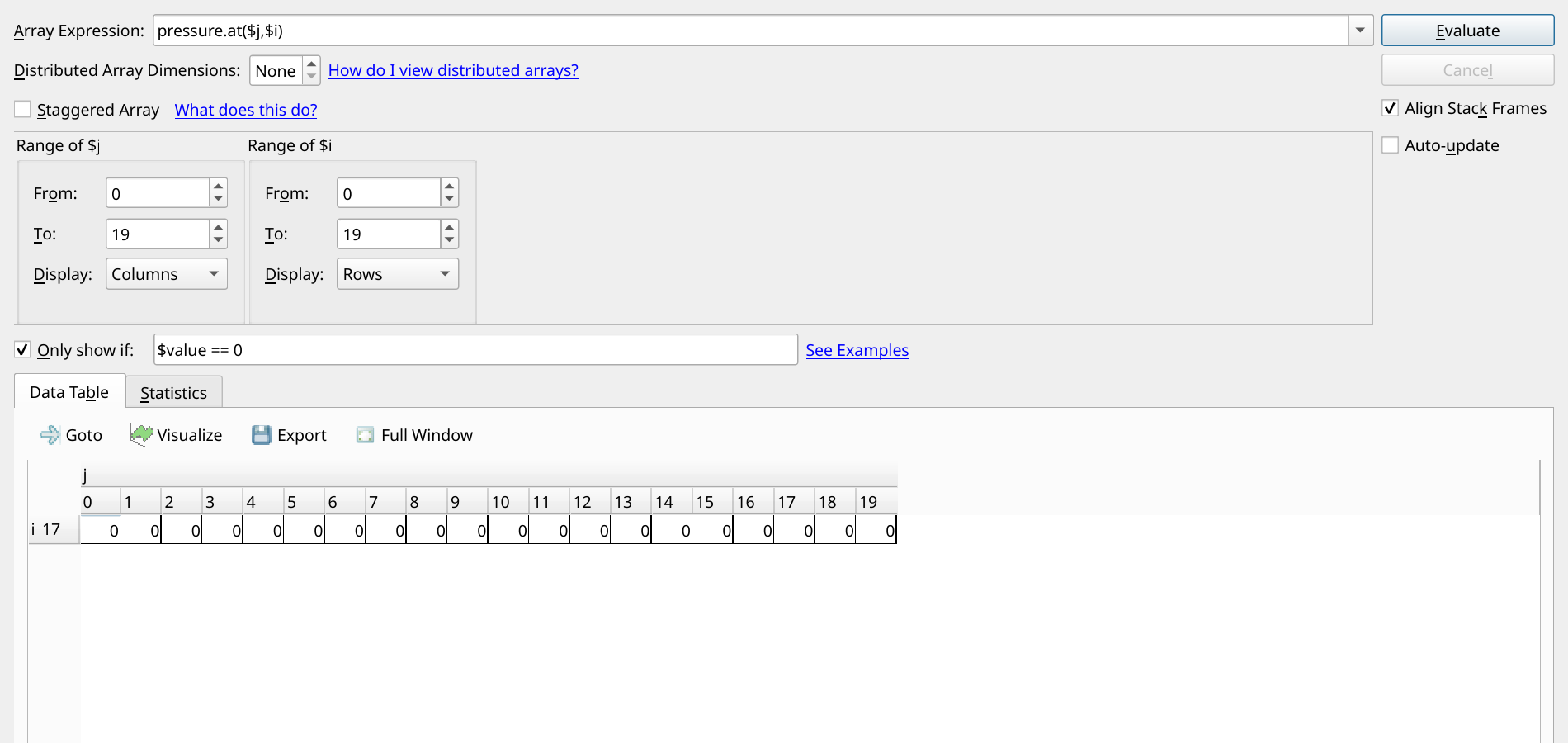
Only show if: $value == 0
The cause and the fix
So the kernel never writes the last row of cells. Which cells a Kokkos kernel visits is set by its execution policy, and here that’s the MDRangePolicy on the line above the lambda:
Kokkos::MDRangePolicy<Kokkos::Rank<2>> policy({x_min + 1, y_min + 1}, {x_max + 2, y_max + 1});Kokkos ranges are half-open, like most ranges in C++: the lower bound is included, but the upper bound is one past the last index. In x the upper bound is x_max + 2, which covers every cell. In y it’s y_max + 1, which stops one row short. It’s an easy slip to make when translating loops from Fortran, where both ends of a range are included. The pressure in the last row stays at zero, which throws off the forces on the cells around it, and the energy budget goes wrong from there. The fix is a single character:
Kokkos::MDRangePolicy<Kokkos::Rank<2>> policy({x_min + 1, y_min + 1}, {x_max + 2, y_max + 2});We rebuild, run to the same breakpoint, and look again. Row 17 has its pressure back, and the full 16-rank run loses 0.038 of energy, just as it did before.
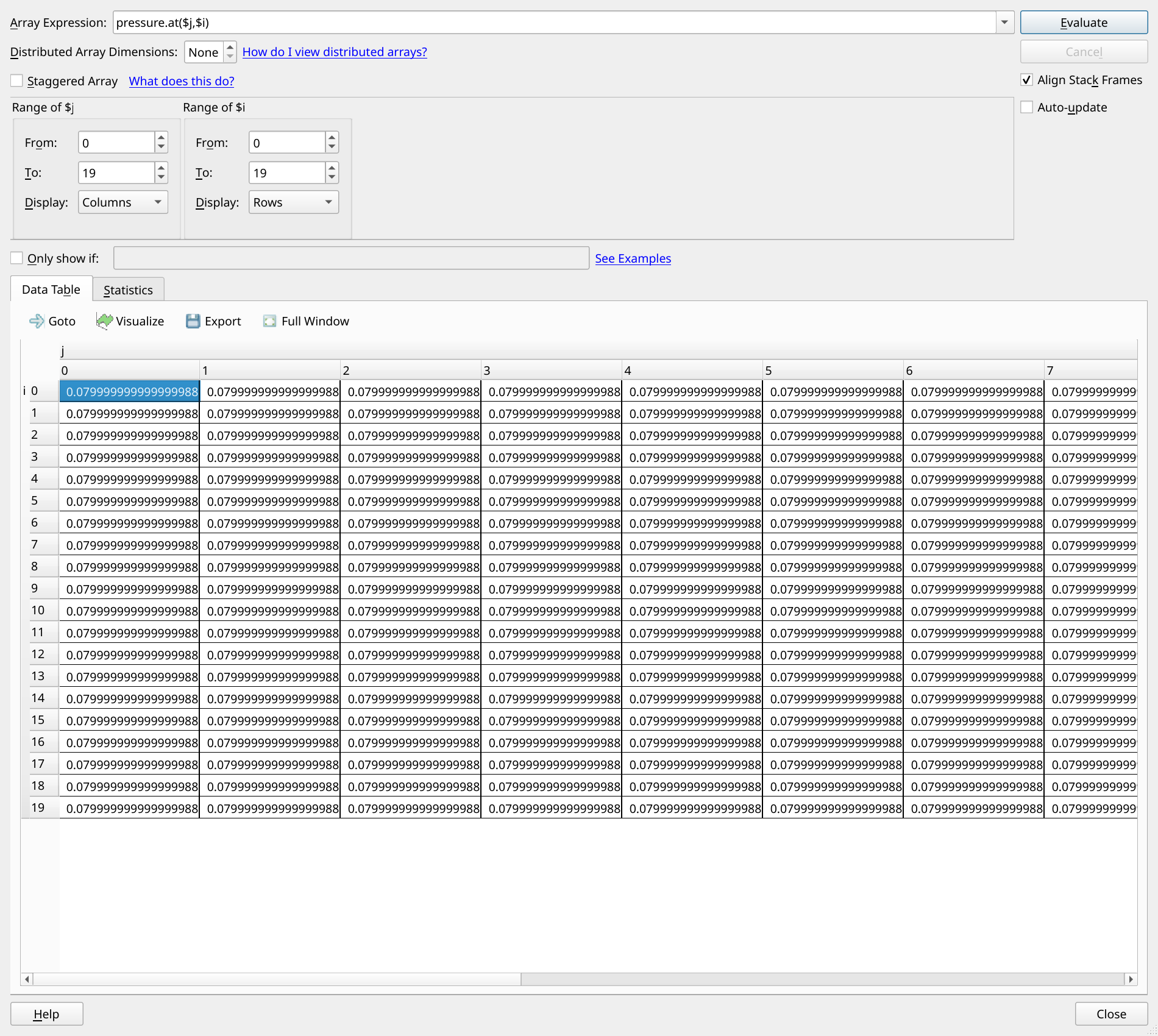
After the fix: row 17 has its pressure back
Part 2: The MPI communication matrix in Linaro MAP
With the physics right again, we turn to performance. We profile the full 16-rank run with MAP, and ask for the communication matrix with one extra option. There’s nothing to recompile and no change to the code:
map --profile --mpi-matrix=calls,bytes,time mpirun -n 16 ./kokkos-cloverleaf --file blog-profile.inIf you prefer the GUI, the same choices are in the Run dialog, under MPI Comm Matrix.
Who’s talking to whom?
Before we open the profile, it’s worth thinking about what we expect to see. CloverLeaf splits the grid into a 4 x 4 arrangement of chunks, one per rank, numbered row by row. Each rank swaps halo data with the ranks above, below, left and right of it. Rank 5, for example, talks to ranks 1, 4, 6 and 9. In the matrix, where each row is a sending rank and each column a receiving rank, that shows up as bright bands just either side of the diagonal (the left and right neighbours) and four places either side of it (the neighbours above and below). Every pair of neighbours swaps the same amount of data, so the bands should all be equally bright, and the rest of the matrix should be dark.
We open the profile and choose View > MPI Comm Matrix. The colour of each cell shows how much data went from one rank to the other over the whole run.
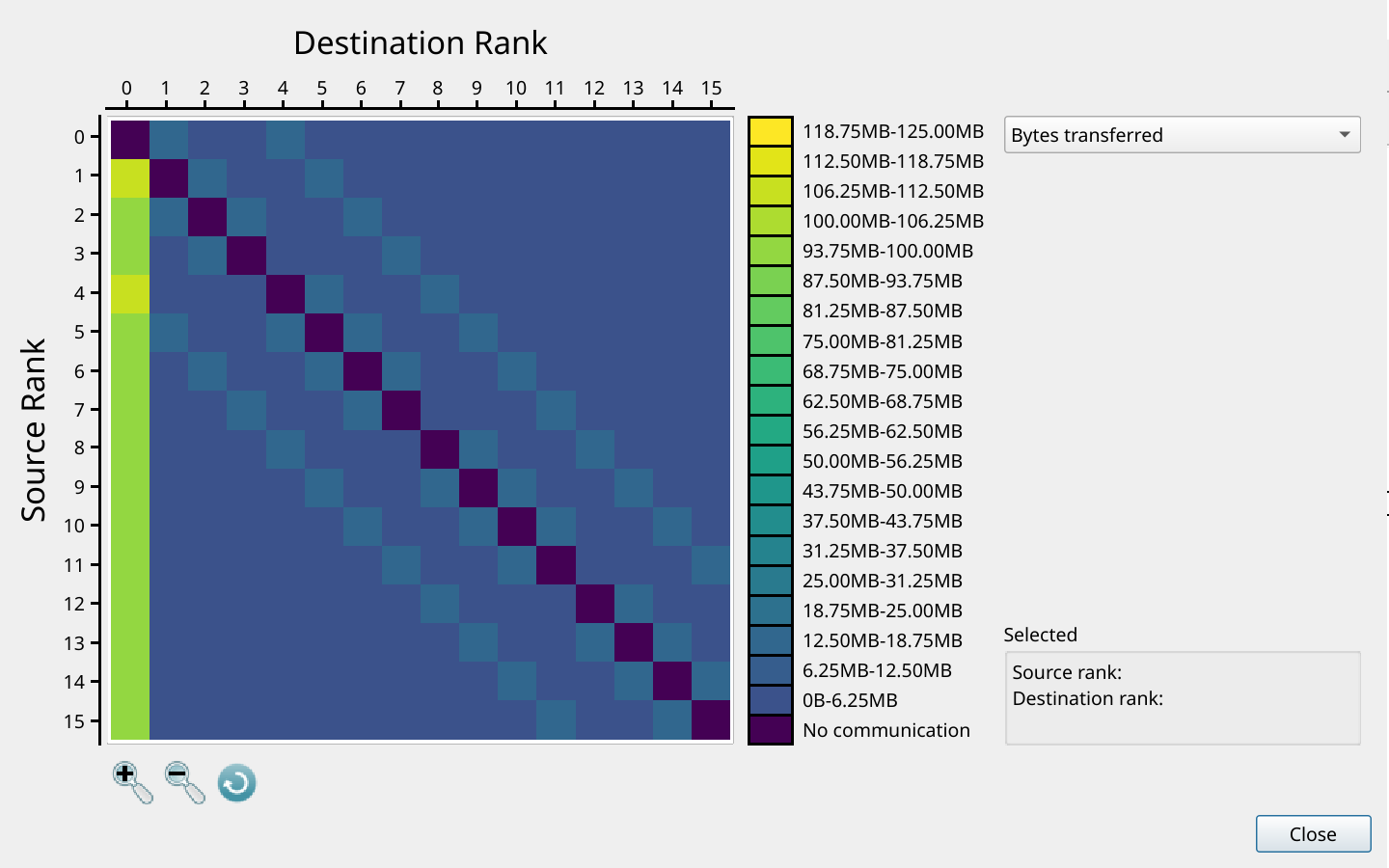
The MPI communication matrix: every rank sends to rank 0
That isn’t the pattern we expected. The halo bands are there, but they’re pale. The brightest thing in the matrix is column 0: every single rank is sending more data to rank 0 than to any of its neighbours, including ranks that are nowhere near rank 0 in the grid.
Clicking a cell shows how much data went between that pair of ranks. Rank 5 sent rank 0 between 93.75 and 100 MB over the run, even though rank 0 isn’t one of its neighbours.
The cause
check_density is an in-situ check: it reports the largest density anywhere in the grid, which is a handy way to keep an eye on a simulation as it runs. It’s meant to run alongside CloverLeaf’s field summary, every 10 steps. But the call sits just after the summary’s if statement instead of inside it, so it runs on every step:
if (globals.config.summary_frequency != 0) {
  if (globals.step % globals.config.summary_frequency == 0) field_summary(globals, parallel);
}
check_density(globals, parallel);
And each time it runs, every rank sends its whole density field to rank 0, almost half a megabyte each, so that rank 0 can search through all of them for the largest value:
// In-situ check: collect every rank's density on rank 0 and report the largest value.
static void check_density(global_variables &globals, parallel_ ¶llel) {
auto d = Kokkos::create_mirror_view_and_copy(Kokkos::HostSpace(), globals.chunk.tiles[0].field.density0.view);
int n = static_cast<int>(d.size());
if (parallel.boss) {
std::vector<double> buf(n);
double dmax = *std::max_element(d.data(), d.data() + n);
for (int r = 1; r < parallel.max_task; ++r) {
MPI_Recv(buf.data(), n, MPI_DOUBLE, r, 99, MPI_COMM_WORLD, MPI_STATUS_IGNORE);
dmax = std::max(dmax, *std::max_element(buf.begin(), buf.end()));
}
last_max_density = dmax;
} else {
MPI_Send(d.data(), n, MPI_DOUBLE, 0, 99, MPI_COMM_WORLD);
}
}It gives the right answer, which is why nobody notices. There are really two problems here, so let’s take them one at a time.
A step in the right direction
The first is the easy one: the check runs ten times as often as it should. Moving the call inside the if puts it back on the summary steps:
if (globals.config.summary_frequency != 0) {
  if (globals.step % globals.config.summary_frequency == 0) {
    field_summary(globals, parallel);
    check_density(globals, parallel);
  }
}
We profile again and open the matrix.
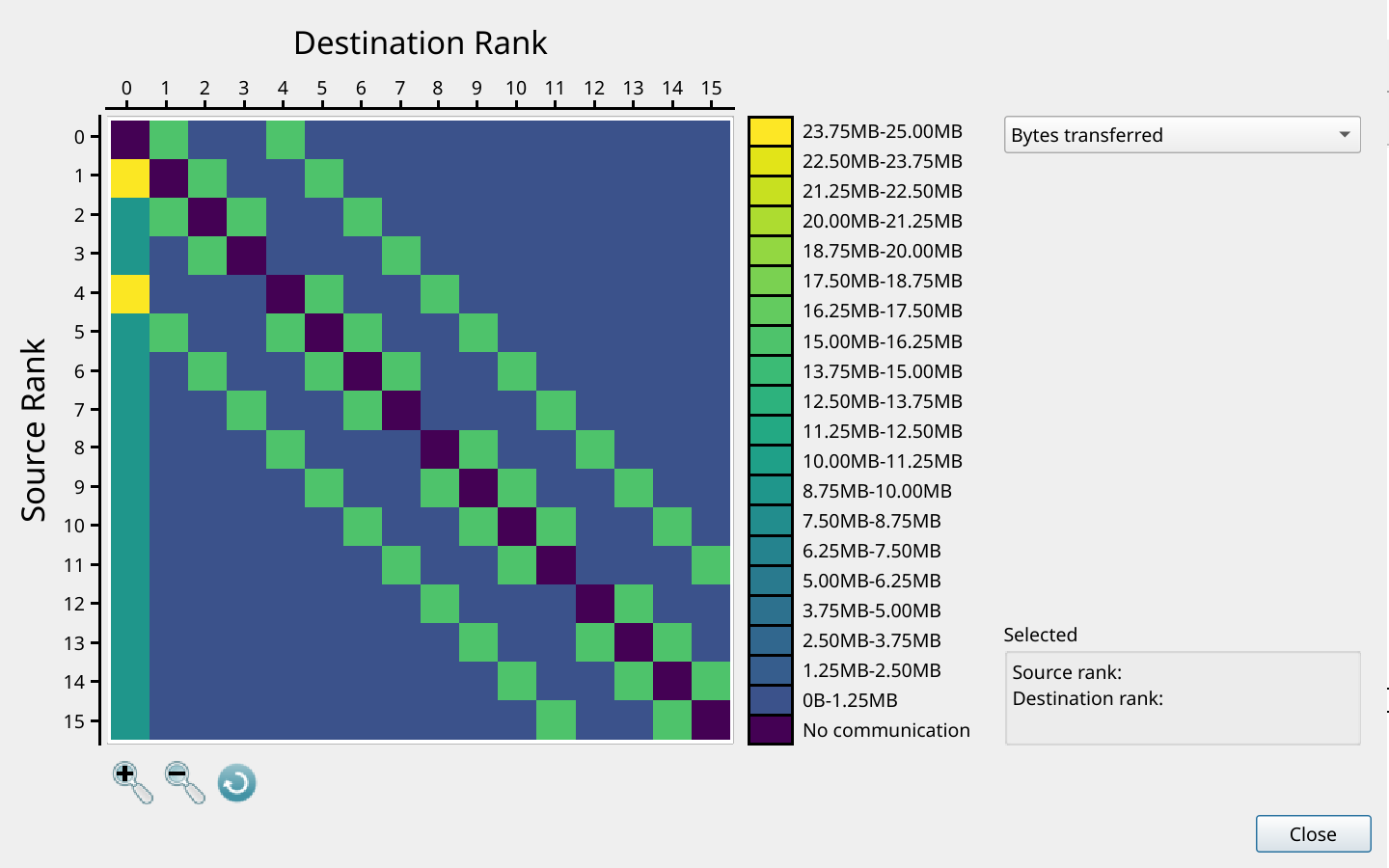
A step in the right direction: column 0 is fainter, but still there
This is much closer to what we expected. The halo bands stand out clearly again, and rank 5 now sends rank 0 between 8.75 and 10 MB. But column 0 hasn’t gone away, and ranks 1 and 4, which are rank 0’s real neighbours, stand out above every other neighbour pair because they’re sending both halo data and density fields. Rank 0 is still receiving every rank’s whole density field, just less often. We’re going in the right direction, but this still isn’t the pattern we would expect.
The full fix
Rank 0 only needs one number from each rank, not its whole field. So we let each rank find its own largest value, and combine them with a single MPI_Reduce, which MPI implements efficiently:
// In-situ check: the largest density on any rank, reported on rank 0.
static void check_density(global_variables &globals, parallel_ ¶llel) {
auto d = Kokkos::create_mirror_view_and_copy(Kokkos::HostSpace(), globals.chunk.tiles[0].field.density0.view);
double local_max = *std::max_element(d.data(), d.data() + d.size());
MPI_Reduce(&local_max, &last_max_density, 1, MPI_DOUBLE, MPI_MAX, 0, MPI_COMM_WORLD);
}We profile one more time.
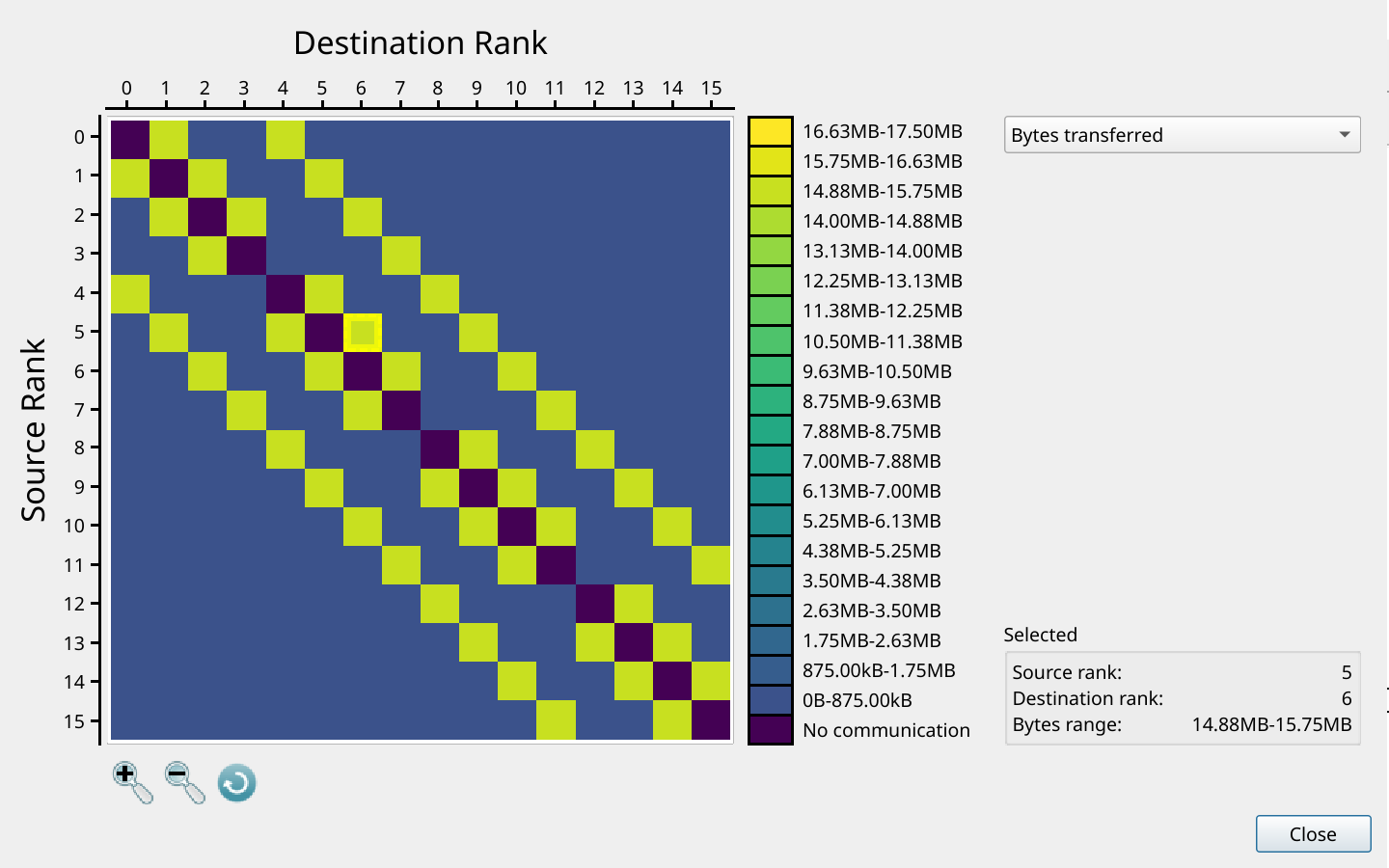
The full fix: the halo pattern we expected
The bands either side of the diagonal are now all the same colour: rank 5 sends rank 6 between 14.88 and 15.75 MB, and so does every other pair of neighbours, including ranks 1 and 4 to rank 0.
On 16 ranks on one node, the old check didn’t cost a great deal: about 6% of the run. But every rank sending its whole chunk of the grid to one rank is exactly the kind of pattern that stops a code from scaling. At a thousand ranks, rank 0 would be receiving a thousand chunks every time the check ran, and everyone else would be waiting for it. The MPI communication matrix showed it to us on 16 ranks, before it became a problem at scale.
What the tool showed us
Neither of these bugs crashed the program, and neither would have shown up in a quick test. The first only showed itself in an energy figure at the end of the run, and the second only in a profile. These are the bugs that cost the most time, because there’s no error message to start from.
With Kokkos View support, DDT let us stop inside a GPU kernel and look straight at the data, laid out the way we think about it, and the missing row was obvious. With the communication matrix, MAP let us compare the communication we expected with the communication that actually happened, and the extra traffic to rank 0 stood out at a glance.
Help share what comes next
We have plenty of ideas for where to take both features next, and we’d like your help choosing. For Kokkos, that might mean support for AMD and for CPU-only builds, clearer displays of DualViews and other View types, or Kokkos-aware profiling in MAP. For the communication matrix, it might mean covering communicators beyond MPI_COMM_WORLD, such as those created with MPI_Comm_split or Cartesian topologies, a JSON export for your own scripts, or a view that relates communication to the nodes it runs on. If one of these would make a difference to your work, or there’s something we haven’t thought of, email support@forge.linaro.com and tell us which matters most to you.