


Introduction
In our first post, we presented a benchmark for Ethos-U65 on i.MX93 using an upstream Linux kernel and upstream Mesa. The purpose of this blog is to explain how those benchmark results were produced, so they can be reproduced on the same hardware or on similar systems. This makes it possible to verify results, compare performance across setups, and understand where differences come from instead of guessing. No local patches are applied here. All steps and commands correspond directly to the upstream baseline.
What we are building
We want TensorFlow Lite models to run on the Ethos-U65 NPU instead of only CPU. The NPU is built for this type of workload. It gives lower latency, lower power usage, and better overall performance compared to running everything on the CPU.
The software looks like this:
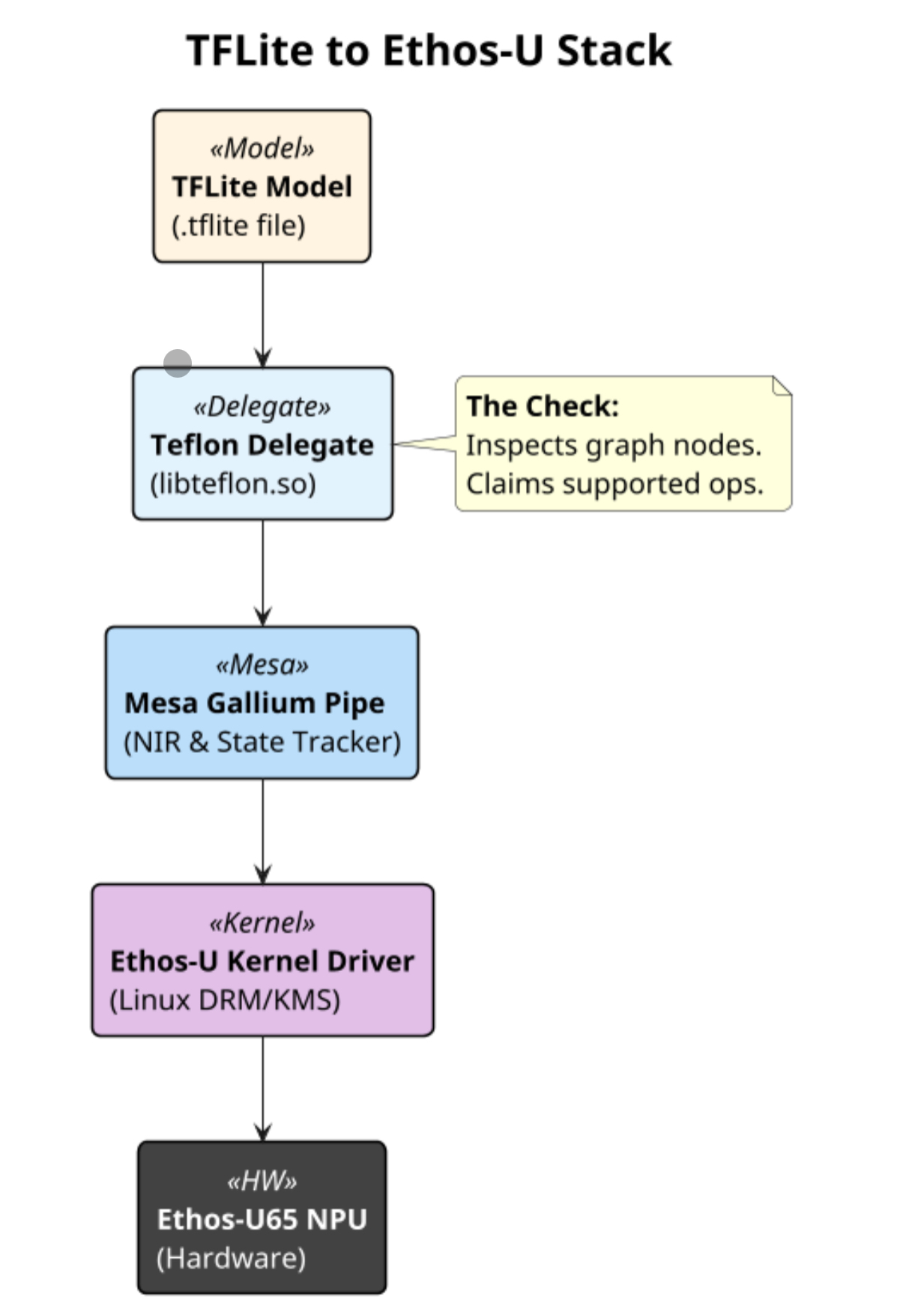
The delegate checks which operations can run on the NPU. Supported ops go to NPU, the rest runs on CPU. This fallback happens silently, so it is important to verify that offload really happens.
Hardware
- SoC: NXP i.MX93
- NPU: ARM Ethos-U65
- Firmware: ONEBoot (Upstream TF-A and U-Boot 2026.01)
Operating system
We tried several Linux distributions and images. Most of them didn’t work well. Although the platform is supported upstream, most distros haven’t enabled the proper drivers yet. However, the Fedora Minimal Raw image worked reliably, both on eMMC and SD.
Flashing the image
Download Fedora Minimal:
wget
https://dl.fedoraproject.org/pub/fedora/linux/releases/43/Spins/aarch64/images/Fedora-Minimal-43-1.6.aarch64.raw.xz
Flash to SD Card:
xzcat Fedora-Minimal-43-1.6.aarch64.raw.xz | sudo dd of=/dev/sdX bs=4M status=progress
sync
Or directly to the eMMC eMMC using uuu. Save the snippet below to imx93.uuu
uuu_version 1.4.127

FB: ucmd mmc dev 0
FB: write -f /path/to/Fedora-Minimal-43-1.6.aarch64.raw -format "mmc write 0x82800000 @off @size" -blksz 512 -each 0x1000000
FB: done
Switch your board to programming mode and run:
uuu imx93.uuuResize the root partition
After the installation it is important to resize the eMMC partitions, otherwise you run out of disk space quickly when installing packages and downloading models.
sudo dnf install cloud-utils-growpart
sudo growpart /dev/mmcblk0 3
sudo resize2fs /dev/mmcblk0p3
sudo reboot
Kernel with Ethos-U65 support
The EthosU driver only got merged upstream recently. As a result it hasn’t found its way to Linux distros yet. You will need to install an updated kernel with the required modules enabled.
Building the kernel
The idea is simple: start from the base defconfig and add only the minimal set of options required for the NPU and the board. We avoid carrying a full kernel config, and instead keep all changes explicit in a small fragment.
Steps in short:
- Start from base defconfig
- Add a small config fragment with only the required options
- Build on top of defconfig
The config fragment (imx93-extra.cfg) looks like this:
# NPU
CONFIG_DRM_ACCEL=y
CONFIG_DRM_ACCEL_ARM_ETHOSU=m

# Display (HDMI on i.MX93)
CONFIG_DRM_I2C_ADV7511_CEC=y
CONFIG_DRM_DW_HDMI=y
CONFIG_DRM_DW_MIPI_DSI=m
CONFIG_DRM_IMX93_MIPI_DSI=m

# Debug
CONFIG_DYNAMIC_DEBUG=y
CONFIG_DEBUG_FS=y

# EFI secure boot / TPM / fwupd
CONFIG_RPMB=m
CONFIG_TEE_STMM_EFI=m
CONFIG_TCG_FTPM_TEE=m
With kernel release v6.19, enabling this config fragment together with defconfig was enough to build a working RPM kernel.
We decided to use tuxmake for the build since v1.35.0 added support for RPM.
tuxmake --runtime podman --target-arch arm64 --toolchain gcc-14 \
  --kconfig defconfig \
  --kconfig-add imx93-extra.cfg \
  binpkg-rpm
Installing the kernel
Copy RPM to target and install:
sudo rpm -ivh --force kernel-*.aarch64.rpm
sudo grubby --info=ALL
sudo grubby --set-default-index=<number for the new kernel>
sudo reboot
After reboot, check:
ls -la /dev/accel/accel0Since the NPU was added in the accelerator subsystem, it now appears as one in your OS.
Mesa Teflon delegate
Teflon is a mesa plugin that connects TFLite with Ethos-U drivers. We reconfigured mesa only with the Ethos-U Gallium driver, since we didn’t need any of the graphics stuff. We also added a gitlab repo with the necessary containers and scripts to make the build easily reproducible.
git clone https://gitlab.com/Linaro/trustedsubstrate/imx93-ethosu-benchmarks.git
cd imx93-ethosu-benchmark
./build-container.sh
After the compilation finishes, you can find [libteflon.so](http://libteflon.so), the teflon shared library, that you need to copy to the target. The container build handles everything including the meson configuration and cross-compilation.
If you prefer to use a local Mesa checkout instead of upstream, you can pass `—local`:
./build-container.sh --localPreparing the demo
Apart from the kernel and the mesa plugins you will also need models and userspace packages that perform the inference. We have added a helper script to download everything that needs to be copied to the target:
./package-demo.shThis collects the inference scripts, models, labels, test images, and `libteflon.so` into one directory. The models are downloaded automatically if they are not already present.
Finally, copy files to the target machine:
scp -r output/demo user@target:~/demo-upstream-mesaRunning the demo
Models used for benchmarking
This setup uses a fixed set of TensorFlow Lite models for benchmarking on i.MX93 with Ethos-U. All models are provided as .tflite files, and most of them are INT8 quantized.
The models cover a few common use cases. For image classification, it includes models like EfficientNet Lite and MobileNet in different sizes. For object detection, it uses SSD MobileNet and EfficientDet Lite models trained on COCO. There are also reference float32 MobileNet models, mainly used for comparison.
Some models come from the Coral test data repo, including pose estimation with MoveNet, face detection, and a few small classifiers for birds, insects and plants. Label files for ImageNet and COCO are included where needed.
The idea is not to test every possible network, but to use a small and well-known set of models in a consistent format. That makes it easier to run benchmarks and compare results across systems.
Running on the target
On the target machine, we use helper scripts to set up the environment and run the benchmarks:
cd ~/demo-upstream-mesa
./prepare-demo.sh
source .venv/bin/activate
LD_LIBRARY_PATH=.:$LD_LIBRARY_PATH ./generate_report.sh report-upstream.md
The prepare script installs `uv`, creates a Python 3.13 virtual environment, and installs all the Python packages (`numpy`, `pillow`, `ai-edge-litert`) that we need. We pin Python 3.13 because `ai-edge-litert` is not supported on Python 3.14 yet.
The `generate_report.sh` script runs all the models on both NPU and CPU, measures the inference times, and writes the results to a markdown file.
Running individual models
If you want to test individual models instead of running the full report, you can use the inference scripts directly.
Image classification:
python3 infer.py test_images/dog.jpg -d libteflon.soExample output:
Loaded NPU delegate: /home/user/libteflon.so
Inference time: 7.51 ms

Top 5 predictions:
 1. Labrador retriever: 0.92
 2. golden retriever: 0.04
 3. tennis ball: 0.01
Object detection:
python3 detect.py test_images/dog.jpg -d libteflon.soExample output:
Loaded NPU delegate: /home/user/libteflon.so
Inference time: 19.01 ms

Detections:
 dog: 95.7% @ [0.08, 0.07, 0.93, 0.94]
To run on CPU instead, use the `—cpu` flag:
python3 infer.py test_images/dog.jpg --cpu
python3 detect.py test_images/dog.jpg --cpu
The INT8 quantized models give identical predictions on both NPU and CPU, so you can use CPU mode to verify results when debugging.
Final conclusion
NPU offload works for the models we tested. But we also saw some problems with other models, like MobileNetV1 and Micronet-large, where the results were not correct. In these cases, some ops were delegated to the CPU instead of the NPU. This shows there are still some gaps in the current upstream Mesa and delegate support across different model types. More testing is needed, and input from others trying different models and workloads would help. So if you try this setup, test your own models and compare results. You can find the scripts and setup in the repository we used. Please share results and/or contributions in the repository. This helps improve coverage, find gaps, and make the NPU path more reliable.