


Intro
Recent work by Linaro along with the U-Boot community allows U-Boot to be built using external libraries and to provide both extended TCP/IP and cryptography support, and as a result U-Boot is now able to provide the facility for HTTPS booting. In this technical blog post we explain how U-boot historically handled (insecure) HTTP booting, what has changed, and how seamless, secure network booting of images is now a reality for U-Boot platforms.
Network-based booting has evolved beyond legacy protocols like PXE (Preboot Execution Environment), which rely on older, often complex setups with TFTP servers and limited security. PXE is a frequent choice for operating system booting, installation and deployment. The concepts behind PXE originated in the early days of protocols like BOOTP/DHCP/TFTP, and it forms part of the Unified Extensible Firmware Interface (UEFI) standard.
In contrast to legacy protocols like PXE, Booting over HTTPS upholds modern security standards such as HTTPS and certificate validation and simplifies management for IT administrators by leveraging existing web infrastructure enabling faster, more reliable, and scalable deployments across diverse networks.
The old U-Boot way
Historically, U-Boot supports booting from HTTP only. It was all a manual process though. You had to download the .iso image, mount it from U-Boot’s command line and start the installer. On top of that not having HTTPS was problematic for modern infrastructure which usually relies on it.
U-Boot traditionally inherits and adapts code from the Linux kernel. But afterwards it’s responsible for enhancing it with new features, maintaining it and providing security fixes. It also tends to keep the code simpler, since bootloaders don’t need that much functionality compared to an OS.
Adding HTTPS on top of the current U-Boot TCP/IP stack proved challenging and time consuming.
Problems in installing an OS
Making the OS installation straightforward had its own challenges. You could still install distros, but manual interception on the kernel command line and installer procedures was needed.
The command line usage problem
As we mentioned before U-Boot did support booting from HTTP but with a lot of manual steps. In order to do so you had to do something like this
=> wget $loadaddr http://192.168.2.100/mini.iso
=> blkmap create debian
=> blkmap map debian 0 ${fileblks} mem $loadaddr
=> fatload blkmap 0:2 0x4b000000 efi/boot/bootaa64.efi
=> bootefi 0x4b000000
Which is less than ideal for end users.
The ExitBootServices problem
Typical distro installers work by mounting a ramdisk and installing from there.
However, in UEFI there’s a point in time where the OS Loader (e.g the Linux kernel EFI stub) calls ExitBootServices. That call transitions the system control from the firmware to the OS. During the ExitBootServices call, Boot time services disappear. Unfortunately these services include the access to the firmware mounted ramdisks which contain our OS installer.
If you are installing from a CDROM this is not a problem as the OS installer scans the available hardware and rediscovers the OS installer. When booting from HTTPS and a mounted ramdisk though this is catastrophic. The installer can’t find the installation medium and stops.
In a previous blog we installed Fedora on a SystemReadyDT compliant platform over HTTP. For the reasons outlined above distros have workarounds to the ExitBootservices problem. E.g Fedora allows you to specify an HTTPS location where you can find the installer contents and continue the installation.
During boot, you need to edit the GRUB boot options and inject ‘inst.stage2’ in the kernel command line
inst.stage2=https://dl.fedoraproject.org/pub/fedora/linux/releases/43/Server/aarch64/os/This works. However, it would be way better to find a way to preserve the ramdisk and make the user experience seamless.
The SetVariable at runtime problem
Once the installation completes, distros typically set the UEFI BootOrder. This is a configuration option that tells the firmware what to load the next time it boots.
Distros add a new entry pointing to SHIM, update the boot order to point to that and reboot to your freshly installed OS. However, U-Boot didn’t always support SetVariable at runtime. This led to scary (but harmless) messages looking like this
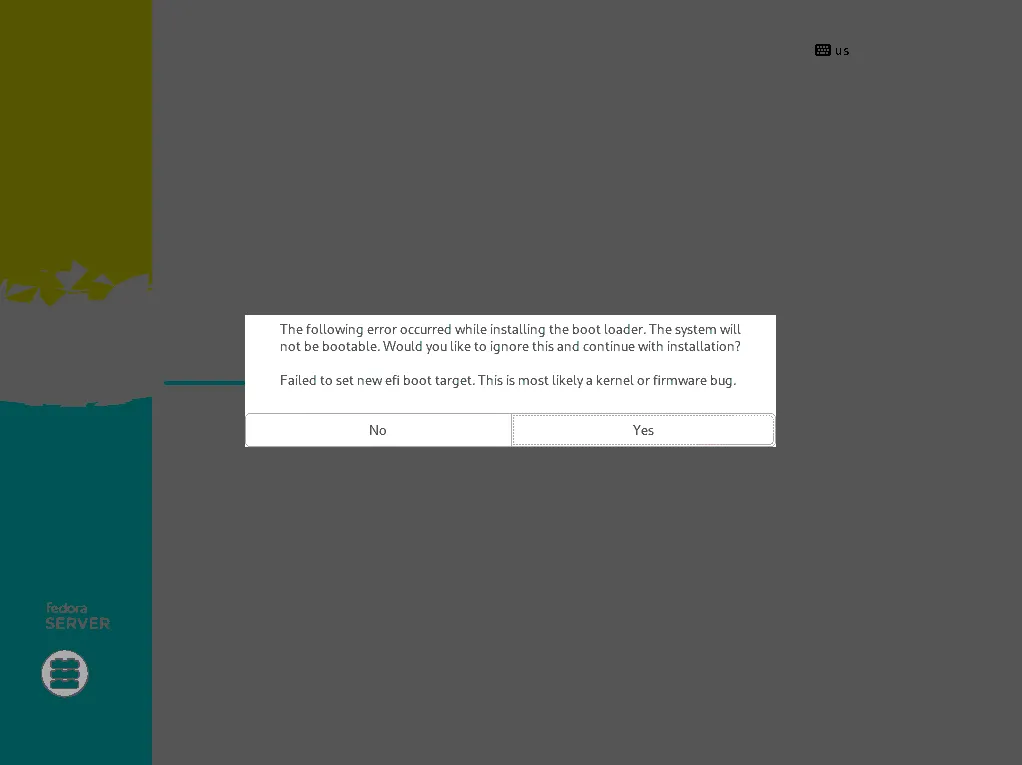
If you ignored the message and rebooted, U-Boot would either discover the new OS and boot if you didn’t have any other boot variables defined or if you did have boot variables defined, you had to manually add a boot entry pointing to your new OS.
Something like
=> efidebug boot add -b 5 fedora mmc 0:1 EFI/fedora/grubaa64.efi
=> efidebug boot order 5
It’s worth noting that this problem affects both types of installers, whether that is over HTTPS or a pluggable installer medium.
The problems above made the user experience clunky. Unless you knew exactly what you were doing, distro installers just seemed to fail on Arm embedded devices.
A new hope (yes, it’s a Star Wars reference)
Making the user experience better and closer to x86, which is what users are typically used to, meant we had to solve these problems. Users should just start the installer and wait for it to complete, instead of manually changing the command line or configuring the firmware to boot properly.
The HTTPS problem
We mentioned before that U-Boot traditionally inherits and adapts code from the Linux kernel. Linaro has worked with the U-Boot community, lwIP and mbedTLS to change the status quo. After a few patches (lwIP, mbedTLS and HTTPS) U-Boot can now be built using external libraries and provide extended TCP/IP and crypto support, and as a result HTTPS support.
If you care to know more, you can read our previous blogs about lwIP support and hardening U-Boot’s HTTPS support.
The command line usage problem
Instead of requiring users to do a series of U-Boot commands to boot from HTTP, we wrapped everything around the EFI boot variables. These patches convert all the manual steps into a single action. You just have to define a UEFI boot option pointing to a URL of an installer image.
The ExitBootServices problem
The Linux kernel has an interesting functionality called ‘pmem’. We can re-use the persistent memory nodes to preserve the OS installers. It gets even better as the Linux kernel can treat those memory areas as regular block devices. Remember how the OS installers scan the available hardware and rediscover the installer when installing from a CDROM? The same thing happens here, the installer finds a block device with the proper contents and continues with the installation. All we had to do was to create the pmem node in firmware and inform the OS about it.
Something that these patches do.
One more problem to go…
The SetVariable at runtime problem
The second problem was a bit more challenging. Due to hardware limitations described in this blog and this blog, in most cases U-Boot ends up preserving UEFI variables in a file located in the EFI System Partition. But the SetVariable at runtime call, an EFI call allowing you to write firmware variables from the OS, is supposed to be executed by the firmware. Making the firmware aware of OS partition layouts, supported filesystems and read/write locking mechanisms to write the variables safely made little sense.
Instead we decided to use an alternative mechanism. This is not 100% compliant with the UEFI spec, as part of the variable writing is now delegated to the OS, but it’s a lot more elegant than the alternatives.
The firmware exposes a memory-backed copy of the EFI variables, which the OS reads and writes though the firmware as expected by the UEFI spec. Once the variables are updated the OS userspace tools directly modify the file that stores the variables, syncing it with the memory-backend. This change is already part of the ‘efivar’ package.
Wrapping it all together
With a recent U-Boot and an OS installer which includes a recent version of the efivar tool the installation over HTTPS completes without any user interaction.
It’s worth noting that the same principle and functionality applies to live OS images. You can now boot a live image over HTTPS. We’ve even added a U-Boot interactive command called ‘eficonfig’ to make the configuration easier.
Here’s how booting from a local HTTPS server looks like.

Notice that ‘/’ is mounted from /dev/pmem0? That’s the memory backed image. The only limiting factor now, is how much available memory your board has, in order to store and use the images from memory!
Conclusion
If you are interested in enabling or extending the latest U-Boot features like HTTPS boot for your embedded platform or product, get in touch with Linaro. We’re happy to talk through what it takes to update to the latest version for more features and ease of future maintenance. We can also explain how to deal with any legacy issues or custom code you may have that could be holding you back from updating.